Classifying Mushrooms With Python and Scikit-Learn

Mushrooms can be either toxic or edible. It takes trained mushroom hunters and mycologists to discern the toxic mushrooms from the edible mushrooms. Can machine learning algorithms also classify the edibility of mushrooms? We’ll visualize some of the data here, to get an idea of how the data is related, and then implement several different classifiers on the dataset.

This might go without saying, but don’t take advice about which mushrooms to eat from a random blog post. I do not condone eating any mushrooms based on the patterns revealed in this notebook or in the accompanying Python script or documentation.

To start with, we’ll import all the necessry modules that we need.

import pandas as pd
import seaborn as sns
import numpy as np
import matplotlib.pyplot as plt
from sklearn.preprocessing import LabelEncoder, StandardScaler
from sklearn.decomposition import PCA
from sklearn.metrics import accuracy_score, confusion_matrix, roc_auc_score, classification_report, log_loss
from sklearn.model_selection import train_test_split, cross_val_score
from sklearn.linear_model import LogisticRegression, SGDClassifier
from sklearn.naive_bayes import GaussianNB
from sklearn.svm import SVC
from sklearn.model_selection import GridSearchCV, RandomizedSearchCV
from sklearn.tree import DecisionTreeClassifier
from sklearn.neighbors import KNeighborsClassifier
from sklearn.ensemble import RandomForestClassifier, GradientBoostingClassifier
from xgboost import XGBClassifier
import warnings
warnings.filterwarnings("ignore")

We’ll load in the data for the mushrooms. Then we need to check if there is any null data in the dataset. There are only two classes: edible and poisonous. We can confirm that this is the case by printing the unique values of the class feature. We’re going to need to encode non-numerical data, that is, transform it into a form that our classifiers can use.

Scikit-Learn has a Label Encoder that will represent our non-numerical values as numerical ones. So we’ll create an instance of the encoder and then apply the transformation to every column in the dataset. We can print out the dataframe to be sure that there the transformations have been correct.

m_data = pd.read_csv('mushrooms.csv')

# check for any null values
print(m_data.isnull().sum())

# see all unique values in a category
print(m_data['class'].unique())

# machine learning systems work with integers, we need to encode these
# string characters into ints

encoder = LabelEncoder()
# now apply the transformation to all the columns:
for col in m_data.columns:
    m_data[col] = encoder.fit_transform(m_data[col])
class                       0
cap-shape                   0
cap-surface                 0
cap-color                   0
bruises                     0
odor                        0
gill-attachment             0
gill-spacing                0
gill-size                   0
gill-color                  0
stalk-shape                 0
stalk-root                  0
stalk-surface-above-ring    0
stalk-surface-below-ring    0
stalk-color-above-ring      0
stalk-color-below-ring      0
veil-type                   0
veil-color                  0
ring-number                 0
ring-type                   0
spore-print-color           0
population                  0
habitat                     0
dtype: int64
['p' 'e']
   class  cap-shape  cap-surface  cap-color  bruises  odor  gill-attachment  \
0      1          5            2          4        1     6                1   
1      0          5            2          9        1     0                1   
2      0          0            2          8        1     3                1   
3      1          5            3          8        1     6                1   
4      0          5            2          3        0     5                1   

   gill-spacing  gill-size  gill-color  ...  stalk-surface-below-ring  \
0             0          1           4  ...                         2   
1             0          0           4  ...                         2   
2             0          0           5  ...                         2   
3             0          1           5  ...                         2   
4             1          0           4  ...                         2   

   stalk-color-above-ring  stalk-color-below-ring  veil-type  veil-color  \
0                       7                       7          0           2   
1                       7                       7          0           2   
2                       7                       7          0           2   
3                       7                       7          0           2   
4                       7                       7          0           2   

   ring-number  ring-type  spore-print-color  population  habitat  
0            1          4                  2           3        5  
1            1          4                  3           2        1  
2            1          4                  3           2        3  
3            1          4                  2           3        5  
4            1          0                  3           0        1  

[5 rows x 23 columns]

Now we can do some plotting of the data. Using Matplotlib, let’s do a heatmap plot, which compares the correlation of every feature with every other feature.

# let's see how many poisonous and edible there are of each, 1 is poisonous, 0 is edible
# check to get a rough idea of correlations
correlations = m_data.corr()
plt.subplots(figsize=(20, 15))
#plt.figure(figsize=(16, 14))
data_corr = sns.heatmap(correlations, annot=True, linewidths=0.5, cmap="RdBu_r")
plt.show(data_corr)
mushroom1.png

It looks like the features most closely associated with class are: cap-surface, gill-attachment, gill-size, veil-color, spore-print-color, population, and habitat. Why don’t we see if we can plot the correlations of those variables individually.

features = ["cap-surface", "gill-attachment", "gill-size", "veil-color", "spore-print-color", "population", "habitat"]

for feature in features:
    line_plot = sns.lineplot(x="class", y=feature, label=feature, data=m_data)
    
plt.legend(loc=1)    
plt.show()
mushroom2

If we are so inclined, we can chart how individual attributes are likely to correlate with a mushroom’s likelihood of beind poisonous. We just get the individual colors stored in the “gill-color” feature and we plot them against class. We need to specify the names of the gill-colors and choose colors to represent them in our plot, however.

gill_names =["buff", "red", "gray", "chocolate", "black", "brown", "orange", "pink", "green", "purple", "white", "yellow"]
gill_colors = ["khaki", "Red", "darkGrey", "chocolate", "Black", "saddleBrown", "orange", "lightpink", "darkGreen", "purple", "lightGrey", "Yellow"]

factor = sns.factorplot(x="gill-color",y="class",data=m_data, kind="bar", size = 8,
palette = gill_colors)
factor.set_xticklabels(rotation=45)
factor.set(xticks=range(0,14), xticklabels=gill_names)
factor = factor.set_ylabels("Prob. Poison")
plt.grid(axis='y')
plt.show()

Now we need to split our data into features and labels. This is easy because the “class” feature is the first in the dataframe, so all we need to do is cast the features as everything but the first column and do the opposite for the labels. We’ll also want to scale the data. Scaling our data is important as the data covers a wide range.

The sheer range of the data can throw off the accuracy of our classifier, so by standardizing the data we make sure our classifier performs optimally. We’ll create an instance of the classifier and then transform the data with it. We don’t need to scale the labels/targets as they are only 0 or 1.

X_features = m_data.iloc[:,1:23]  
y_label = m_data.iloc[:, 0]  

# we should probably scale the features, so that SVM or gaussian NB can deliver better predictions
scaler = StandardScaler()
X_features = scaler.fit_transform(X_features)

Principal Component Analysis is a method that can simplify the representation of features, distilling the most important features down into a combination of just a few features. PCA can help improve the outcome of a classifier. However, PCA works best when datasets are large, and since this dataset is relatively small, we may not want to do it. We can plot the conclusions of the PCA to see what kind of dimensions the data would be compressed to.

We fit the PCA on our features and plot the explained variance ratio. The explained variance ratio is a way of measuring how many features describe a given portion of the data. We can plot our this function to get an idea of how many features are needed to describe 90% or 100% of the data. Let’s plot the ratio.

# principal component analysis, may or may not want to do, small dataset
pca = PCA()
pca.fit_transform(X_features)
plt.figure(figsize=(10,10))
# plot the explained variance ratio
plt.plot(np.cumsum(pca.explained_variance_ratio_), 'ro-')
plt.grid()
plt.show()
# it looks like about 17 of the features account for about 95% of the variance in the dataset
mushroom4

Here’s another way that the explained variance can be plotted. Plotting it like this leads to the same conclusion: around 18 features describe 99% of the dataset.

# here's another way to visualize this
pca_variance = pca.explained_variance_

plt.figure(figsize=(8, 6))
plt.bar(range(22), pca_variance, alpha=0.5, align='center', label='individual variance')
plt.legend()
plt.ylabel('Variance ratio')
plt.xlabel('Principal components')
plt.show()
mushroom5

Let’s go ahead and create a new PCA object and use 17 or 18 features to comprise our new featureset.

pca2 = PCA(n_components=17)
x_new = pca2.fit_transform(X_features)
X_train, X_test, y_train, y_test = train_test_split(x_new, y_label, test_size=0.20, random_state=2)

Now we can select our chosen classifiers and run GridSearchCV to find their best possible parameters. GridSearchCV takes a specified list of parameters and tests the classifier with the potential combinatiosn of your schosen parameters to see which combination is best. Doing this should dramatically improve the performance of our classifiers compared to just implementing them vanilla. We have to fit GridSearchCV on the classifiers and our chosen parameters, and then save the optimized settings as a new instance of the classifier.

logreg_clf = LogisticRegression()
parameters_logreg = {"penalty": ["l2"], "solver": ["newton-cg", "lbfgs", "liblinear", "sag", "saga"],
                     "max_iter": [25, 50, 100, 200, 400]}
grid_logreg = GridSearchCV(logreg_clf, parameters_logreg)
grid_logreg.fit(X_train, y_train)
logreg_opt = grid_logreg.best_estimator_

GNB_clf = GaussianNB()
GNB_clf.fit(X_train, y_train)

svc_clf = SVC()
svc_param = {"kernel": ["rbf", "linear"]}
grid_svc = GridSearchCV(svc_clf, svc_param)
grid_svc.fit(X_train, y_train)
svc_opt = grid_svc.best_estimator_

rf_clf = RandomForestClassifier()
parameters_rf = {"n_estimators": [4, 6, 8, 10, 12, 14, 16], "criterion": ["gini", "entropy"], "max_features": ["auto", "sqrt", "log2"],
                 "max_depth": [2, 3, 5, 10], "min_samples_split": [2, 3, 5, 10]}
grid_rf = GridSearchCV(rf_clf, parameters_rf)
grid_rf.fit(X_train, y_train)
rf_opt = grid_rf.best_estimator_

knn_clf = KNeighborsClassifier()
parameters_knn = {"n_neighbors": [3, 5, 10, 15, 20], "weights": ["uniform", "distance"],
                  "leaf_size": [10, 20, 30, 45, 60]}
grid_knn = GridSearchCV(knn_clf, parameters_knn)
grid_knn.fit(X_train, y_train)
knn_opt = grid_knn.best_estimator_

dt_clf = DecisionTreeClassifier()
parameters_dt = {"criterion": ["gini", "entropy"], "splitter": ["best", "random"], "max_features": ["auto", "log2", "sqrt"]}
grid_dt = GridSearchCV(dt_clf, parameters_dt)
grid_dt.fit(X_train, y_train)
dt_opt = grid_dt.best_estimator_

xgb_clf = XGBClassifier()
parameters_xg = {"objective" : ["reg:linear"], "n_estimators" : [5, 10, 15, 20]}
grid_xg = GridSearchCV(xgb_clf, parameters_xg)
grid_xg.fit(X_train, y_train)
xgb_opt = grid_xg.best_estimator_

chosen_metrics = [accuracy_score, log_loss, classification_report]

Finally, we can create a function to do the classification and return our chosen metrics.

def get_reports(metrics, classifier):

    preds = classifier.predict(X_test)
    print("'{}' Performance: ".format(classifier.__class__.__name__))
    acc = accuracy_score(y_test, preds)
    l_loss = log_loss(y_test, preds)
    c_report = classification_report(y_test, preds)
    print("Accuracy: " + str(acc))
    print("Log Loss: " + str(l_loss))
    print("Classificaiton Report: ")
    print(c_report)
    print("----------")

get_reports(chosen_metrics, logreg_opt)
get_reports(chosen_metrics, GNB_clf)
get_reports(chosen_metrics, svc_opt)
get_reports(chosen_metrics, rf_opt)
get_reports(chosen_metrics, knn_opt)
get_reports(chosen_metrics, dt_opt)
get_reports(chosen_metrics, xgb_opt)

'LogisticRegression' Performance: 
Accuracy: 0.9427692307692308
Log Loss: 1.9766989475886843
Classificaiton Report: 
              precision    recall  f1-score   support

           0       0.94      0.96      0.95       860
           1       0.95      0.93      0.94       765

    accuracy                           0.94      1625
   macro avg       0.94      0.94      0.94      1625
weighted avg       0.94      0.94      0.94      1625

----------
'GaussianNB' Performance: 
Accuracy: 0.9298461538461539
Log Loss: 2.423050640308682
Classificaiton Report: 
              precision    recall  f1-score   support

           0       0.92      0.95      0.93       860
           1       0.94      0.91      0.92       765

    accuracy                           0.93      1625
   macro avg       0.93      0.93      0.93      1625
weighted avg       0.93      0.93      0.93      1625

----------
'SVC' Performance: 
Accuracy: 1.0
Log Loss: 9.992007221626413e-16
Classificaiton Report: 
              precision    recall  f1-score   support

           0       1.00      1.00      1.00       860
           1       1.00      1.00      1.00       765

    accuracy                           1.00      1625
   macro avg       1.00      1.00      1.00      1625
weighted avg       1.00      1.00      1.00      1625

----------
'RandomForestClassifier' Performance: 
Accuracy: 1.0
Log Loss: 9.992007221626413e-16
Classificaiton Report: 
              precision    recall  f1-score   support

           0       1.00      1.00      1.00       860
           1       1.00      1.00      1.00       765

    accuracy                           1.00      1625
   macro avg       1.00      1.00      1.00      1625
weighted avg       1.00      1.00      1.00      1625

----------
'KNeighborsClassifier' Performance: 
Accuracy: 1.0
Log Loss: 9.992007221626413e-16
Classificaiton Report: 
              precision    recall  f1-score   support

           0       1.00      1.00      1.00       860
           1       1.00      1.00      1.00       765

    accuracy                           1.00      1625
   macro avg       1.00      1.00      1.00      1625
weighted avg       1.00      1.00      1.00      1625

----------
'DecisionTreeClassifier' Performance: 
Accuracy: 0.992
Log Loss: 0.2763131635190287
Classificaiton Report: 
              precision    recall  f1-score   support

           0       0.99      0.99      0.99       860
           1       0.99      0.99      0.99       765

    accuracy                           0.99      1625
   macro avg       0.99      0.99      0.99      1625
weighted avg       0.99      0.99      0.99      1625

----------
'XGBClassifier' Performance: 
Accuracy: 0.968
Log Loss: 1.1052531461360688
Classificaiton Report: 
              precision    recall  f1-score   support

           0       0.97      0.97      0.97       860
           1       0.97      0.96      0.97       765

    accuracy                           0.97      1625
   macro avg       0.97      0.97      0.97      1625
weighted avg       0.97      0.97      0.97      1625

----------

I highly recommend experimenting with the different classifiers to get a better idea of which classifiers work better under different circumstances. You can check out a list of classifiers supported by Scikit-learn here or here.

Carrying Out Transfer Learning On X-Ray Images

Training a deep neural network can take a substantial amount of time. Not only will you often need to create a model architecture and train the model, but you’ll likely need to tweak the model to get optimal performance out of the model. This can drastically increase the amount of time needed to train a model. In order to speed up the process of training and deploying a model, a technique called transfer learning is used. Transfer learning lets you take a model architecture and reuse it, potentially using the same weights the model has learned before.

You can take a model architecture than has already been defined and reuse it, either using the same weights or retaining the model and just using the architecture. You can also do something in between and retrain just some of the layers of the architecture. This blog post will demonstrate the creation of a deep learning model in Keras and then demonstrate how the model can be reused on another, similar dataset. 

I’ll be creating a Convolutional Neural Network in Keras, saving the model and then reapplying it to another image classification problem. We’ll be using the Chest X-Ray Image Dataset, available HERE for this project. I’ll be splitting up the training data folder into a training and validation set. We’ll use this initial dataset for the training and testing of the model. After that, I’ll apply some perturbations to the test dataset to simulate image corruption and transfer the pre-trained model over, retraining it to classify the damaged images.

To begin with, here are the imports we’ll need.

from keras.preprocessing.image import ImageDataGenerator
import keras
from keras.models import Sequential
from keras.layers import Dense, Conv2D, BatchNormalization, Dropout, MaxPooling2D, Flatten, Activation
from keras.callbacks import ModelCheckpoint, ReduceLROnPlateau, EarlyStopping
import matplotlib.pyplot as plt

Now we’ll define some variables we’ll need, as well as handle different possible input specifications for our model. Some models want the channels listed first, others don’t.

batch_size = 16
im_height = 150
im_width = 150

# handling the different possible input shapes for the model

if keras.backend.image_data_format() == 'channels_first':
    inp_shape = (3, im_width, im_height)
else:
    inp_shape = (im_width, im_height, 3)

We’ll now want to specify the directories and use the ImageDataGenerator to get the image data from the directories. After that, we’ll use the generators and make iterables from them using flow_from_directory.

train_dir = "chest_xray/train"
val_dir = "chest_xray/val"
test_dir = "chest_xray/test"

# generate the data for both training and validation data
# when we instantiate the data generator we pass in transformations to use
# rescaling and flipping here

train_1_datagen = ImageDataGenerator(rescale=1. / 255)

train_2_datagen = ImageDataGenerator(rescale=1. /255, shear_range=0.2, zoom_range=0.2, horizontal_flip=True, rotation_range=30,
                                     width_shift_range=0., channel_shift_range=0.9, brightness_range=[0.5, 1.5])

test_datagen = ImageDataGenerator(rescale=1. /255)

test_datagen_2 = ImageDataGenerator(rescale=1. /255, shear_range=0.2, zoom_range=0.2, horizontal_flip=True, rotation_range=30,
                                     width_shift_range=0., channel_shift_range=0.9, brightness_range=[0.5, 1.5])

# after creating the objects flow from directory
# declare what directory to flow from, as well as image size and batch size
# class mode is binary here, either normal xray or not normal

# we could do "class_mode = binary" here, if so, be sure to make the final output 1 and not 2

train_generator_1 = train_1_datagen.flow_from_directory(train_dir, target_size=(im_width, im_height),
                                                    batch_size=batch_size)

test_generator_1 = test_datagen.flow_from_directory(test_dir, target_size=(im_width, im_height),
                                                    batch_size = batch_size)

train_generator_2 = train_2_datagen.flow_from_directory(val_dir, target_size=(im_width, im_height),
                                                    batch_size = batch_size)

test_generator_2 = test_datagen_2.flow_from_directory(test_dir, target_size=(im_width, im_height),
                                                    batch_size = batch_size)

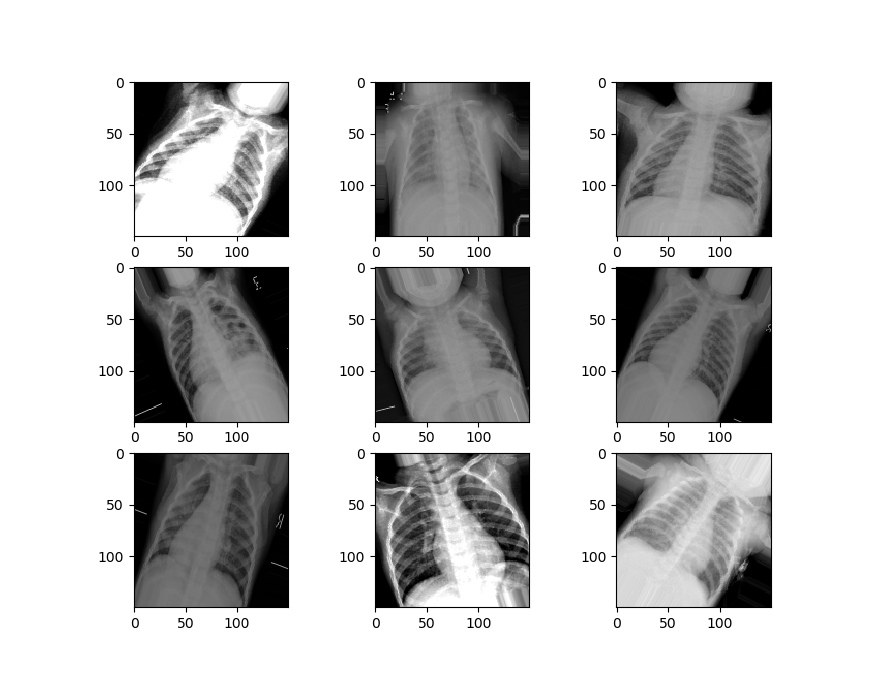
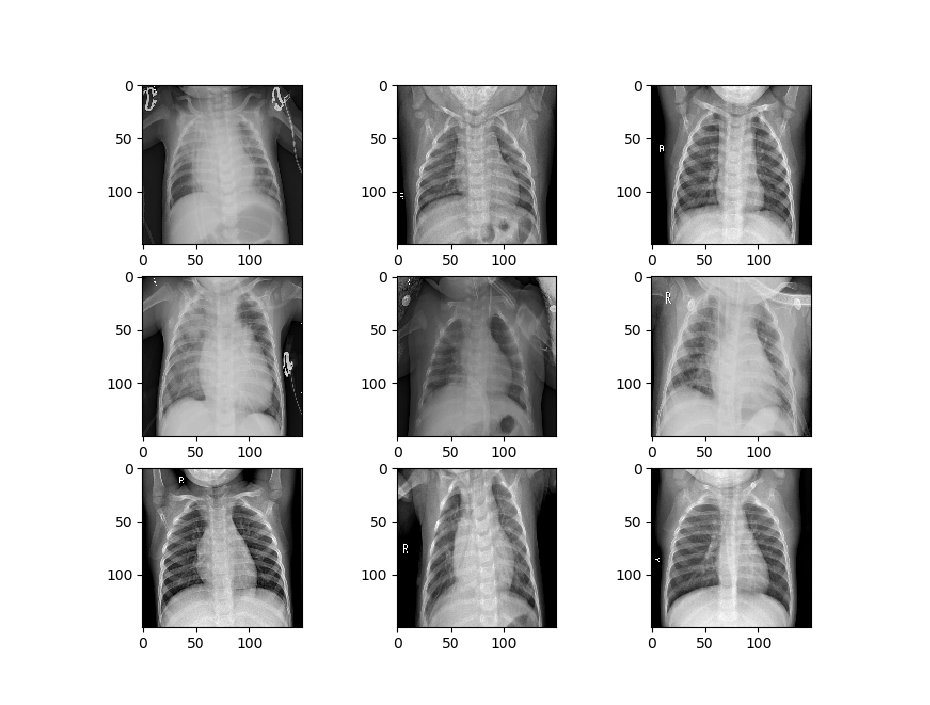
Let’s visualize some of the data to get a better idea of how the datasets will differ. First, we’ll visualize the data that is being used to train the first model.

def image_show(image_generator):
    x, y = image_generator.next()
    fig = plt.figure(figsize=(8, 8))
    columns = 3
    rows = 3
    for i in range(1, 10):
        # img = np.random.randint(10)
        image = x[i]
        fig.add_subplot(rows, columns, i)
        plt.imshow(image.transpose(0, 1, 2))
    plt.show()
    
image_show(train_generator_1)

Now we’ll visualize the second set of data.

We can see that our second set of data is a little different from the first set. It’s zoomed in, rotated randomly, has image artifacts and more, to simulate the kinds of damages that might happen to an image in the real world.

Now we can make a function to handle the creation of our model. This function will establish the sequential model form and add the layers of the convolutional network – with the convolutional layers, the Max Pooling, and some batch normalization.

We’ll have three of these “blocks” comprising the convolutional layers in our network. These will be followed by a flattening layer, which transforms the data into a long vector that the densely connected layers of the neural network will be able to analyze. We’ll then add in our densely connected layers and activation functions, along with some dropout to prevent overfitting. We then compile the model and return it.

def create_model():
    # first specify the sequential nature of the model

    model = Sequential()

    # second parameter is the size of the "window" you want the CNN to use

    # the shape of the data we are passing in, 3 x 150 x 150
    # last element is just the image in the series, others are pixel widths

    model.add(Conv2D(64, (3, 3), input_shape=(150, 150, 3)))
    model.add(Activation("relu"))
    model.add(MaxPooling2D(pool_size=(2,2)))
    model.add(BatchNormalization())

    model.add(Conv2D(128, (3, 3)))
    model.add(Activation("relu"))
    model.add(MaxPooling2D(pool_size=(2,2)))
    model.add(BatchNormalization())

    model.add(Conv2D(256, (3, 3)))
    model.add(Activation("relu"))
    model.add(MaxPooling2D(pool_size=(2, 2)))
    model.add(BatchNormalization())

    model.add(Conv2D(256, (3, 3)))
    model.add(Activation("relu"))
    model.add(MaxPooling2D(pool_size=(2, 2)))
    model.add(BatchNormalization())

    # you'll need to flatten the data again if you plan on having Dense layers in the model,
    # as it needs a 1d unlike a 2d CNN

    model.add(Flatten())

    model.add(Dense(128, activation='relu'))
    model.add(Dropout(0.2))
    model.add(Dense(64, activation='relu'))
    model.add(Dropout(0.2))
    model.add(Dense(2, activation='sigmoid'))

    # now compile the model, specify loss, optimization, etc

    model.compile(loss='binary_crossentropy', optimizer='adam', metrics=['accuracy'])

    # fit the model, specify batch size, validation split and epochs

    return model

model = create_model()


Now we’ll create the model by calling the function.

We need to use the fit_generator function to fit our model since we used a data generator to set up the image data. We’re also going to specify some callbacks here, which specify how we want our model to behave while training.

The callbacks we will use include:

Model Checkpoint – which saves weights occasionally when a specified event happens (in our case when the validation accuracy improves.

Reduce LR On Plateau, which reduces the learning rate of our classifier when it hits a plateau and stops improving on the loss. This helps to avoid getting stuck oscillating around minimum loss.

Finally, Early Stopping lets us stop training early if we’ve hit a point where validation loss stops decreasing for some given amount of time, which is defined by our “patience”.

We pass in these callbacks and then fit the model, saving it in a variable so we can access the training records later.

filepath = "weights_training_1.hdf5"
callbacks = [ModelCheckpoint(filepath, monitor='val_acc', verbose=1, save_best_only=True, mode='max'),
              ReduceLROnPlateau(monitor='val_loss', factor=0.2, patience=3, verbose=1, mode='min', min_lr=0.00001),
              EarlyStopping(monitor= 'val_loss', min_delta=1e-10, patience=15, verbose=1, restore_best_weights=True)]

records = model.fit_generator(train_generator_1, steps_per_epoch=100, epochs=25, validation_data=test_generator_1, validation_steps=7, verbose=1, callbacks=callbacks)

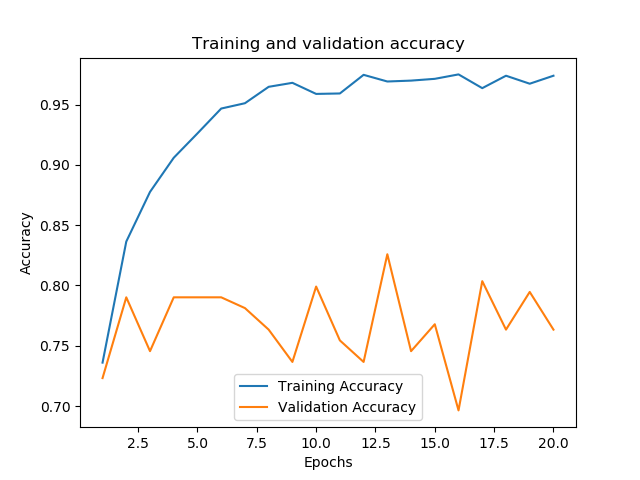
After our training is complete and the best weights have been saved, let’s evaluate the performance of our model. We’ll create a function that plots the loss and accuracy of the training and validation sets. We’ll also evaluate the model’s performance using the evaluation metric we specified in the generator, which we can save to a variable and print.

First, we’ll need to get the loss on the training and validation sets, which we can draw from the “records” variable.

t_loss = records.history['loss']
v_loss = records.history['val_loss']
t_acc = records.history['acc']
v_acc = records.history['val_acc']

# gets the lengt of how long the model was trained for
train_length = range(1, len(t_acc) + 1)

Now we’ll create the function to evaluate our model’s performance.

def evaluation(model, train_length, training_acc, val_acc, training_loss, validation_loss, generator):

    # plot the loss across the number of epochs
    plt.figure()
    plt.plot(train_length, training_loss, label='Training Loss')
    plt.plot(train_length, validation_loss, label='Validation Loss')
    plt.xlabel('Epochs')
    plt.ylabel('Loss')
    plt.legend()

    plt.figure()
    plt.plot(train_length, training_acc, label='Training Accuracy')
    plt.plot(train_length, val_acc, label='Validation Accuracy')
    plt.title('Training and validation accuracy')
    plt.xlabel('Epochs')
    plt.ylabel('Accuracy')
    plt.legend()
    plt.show()

    # compare against the test training set
    # get the score/accuracy for the current model
    scores = model.evaluate_generator(generator)
    print("\n%s: %.2f%%" % (model.metrics_names[1], scores[1] * 100))

We have around 83% accuracy already. Not bad.

acc: 83.09%

Now we can call the function and evaluate how our model trained along with its performance on the dataset.

 evaluation(model, train_length, t_acc, v_acc, t_loss, v_loss, test_generator_1) 

We’re now going to train a second model that uses the weights and architecture from our first model. We’ll load in the trained weights into a second instance of our model. Then we’ll specify that we only want to train the last five layers of our model, a portion of the densely connected layers. We can make sure these are set up to train by printing out the trainable layers of the model.

model_2 = create_model()
model_2.load_weights("weights_training_1.hdf5")

for layer in model_2.layers[:-5]:
    layer.trainable = False

for layer in model_2.layers:
    print(layer, layer.trainable)

Now we just need to compile and fit the model.

# now compile the model, specify loss, optimization, etc
model_2.compile(loss='binary_crossentropy', optimizer='adam', metrics=['accuracy'])

# fit the model, specify batch size, validation split and epochs

filepath = "C:/Users/Daniel/Downloads/chest-xray-pneumonia/chest_xray/weights_training_2.hdf5"
callbacks = [ModelCheckpoint(filepath, monitor='val_acc', verbose=1, save_best_only=True, mode='max'),
              ReduceLROnPlateau(monitor='val_loss', factor=0.2, patience=3, verbose=1, mode='min', min_lr=0.00001),
              EarlyStopping(monitor= 'val_loss', min_delta=1e-10, patience=15, verbose=1, restore_best_weights=True)]

records = model_2.fit_generator(train_generator_2, steps_per_epoch=85, epochs=20, validation_data=test_generator_2, validation_steps=7, verbose=1, callbacks=callbacks)

Finally, let’s check to see how the second model performed by getting its metrics.

t_loss = records.history['loss']
v_loss = records.history['val_loss']
t_acc = records.history['acc']
v_acc = records.history['val_acc']

# gets the length of how long the model was trained for
train_length = range(1, len(t_acc) + 1)

evaluation(model_2, train_length, t_acc, v_acc, t_loss, v_loss, 80, test_generator_2)

acc: 73.48%

We can see that after training it for only two epochs, and despite the perturbations applied to the dataset, performance quickly hit over 70%.

Video Game Sales Analysis – Visualization and Regression

In machine learning, most problems can put in one of two categories: unsupervised learning and supervised learning. In supervised learning tasks, you know what classes your data points belong to, which means that you can check the performance of your classifier on your dataset. In contrast, in an unsupervised learning task you don’t have specific class labels for your data and it is often up to the researcher to come up with meaningful correlations and explore potential patterns in the dataset using statistical techniques like regression.

In this post, I’m going to demonstrate the process of taking a dataset and carrying out regression on the dataset in order to predict some possible trends using Scikit-learn in Python. The post will also demonstrate the process of visualizing data with Pandas, Seaborn, and Matplotlib.

For this post, we’ll be using the video game sales dataset, available HERE.

As you might expect, we’ll start off by importing all the libraries we will need.

import matplotlib.pyplot as plt
import pandas as pd
import numpy as np
import seaborn as sns
from sklearn.model_selection import train_test_split
from sklearn.linear_model import LinearRegression, ElasticNet, Lasso, Ridge
from sklearn.tree import DecisionTreeRegressor
from sklearn.ensemble import RandomForestRegressor, AdaBoostRegressor
from sklearn.preprocessing import StandardScaler
from sklearn.decomposition import PCA
from sklearn.pipeline import Pipeline

Let’s start off by loading the data and checking the number of occurrences for features we might be interested in.

df = pd.read_csv("vgsales.csv")

# get an idea of the total number of occurences for important features

publishers = df['Publisher'].unique()
platforms = df['Platform'].unique()
genres = df['Genre'].unique()

print("Number of games: ", len(df))
print("Number of publishers: ", len(publishers))
print("Number of platforms: ", len(platforms))
print("Number of genres: ", len(genres))
Number of games:  16598
Number of publishers:  579
Number of platforms:  31
Number of genres:  12

We need to be sure that our data is free of any null values, so we’ll check for them and drop them if there are any.

print(df.isnull().sum())

# drop them if there are any
df = df.dropna()
Rank              0
Name              0
Platform          0
Year            271
Genre             0
Publisher        58
NA_Sales          0
EU_Sales          0
JP_Sales          0
Other_Sales       0
Global_Sales      0
dtype: int64

One of the first things we may try doing is checking to see how many global game sales there are a year. We can count how many years there are in the database, then we can plot the years against the global sales.

# if we wanted the counts instead, we could just use Count. Count returns the number of instances,
# not the sums of the values like above
x = df.groupby(['Year']).count()
x = x['Global_Sales']
y = x.index.astype(int)

plt.figure(figsize=(12,8))
colors = sns.color_palette("muted")
ax = sns.barplot(y = y, x = x, orient='h', palette=colors)
ax.set_xlabel(xlabel='Number of releases', fontsize=16)
ax.set_ylabel(ylabel='Year', fontsize=16)
ax.set_title(label='Game Releases Per Year', fontsize=20)

plt.show()


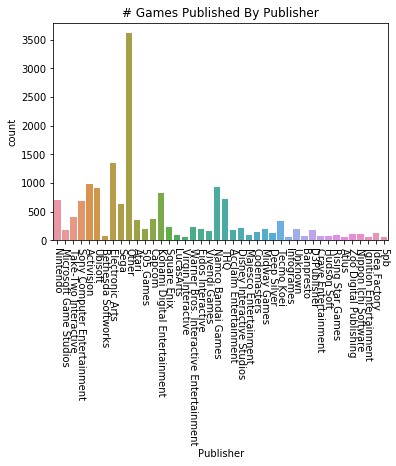
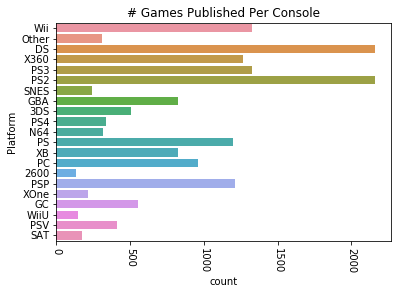
Let’s get an idea of how many games are published by specific publishers. There’s a lot of publishers in this list, so we want to drop any publishers that have published fewer than a chosen number of games. Let’s set 75 as a threshhold. We’ll also apply this same method to the platforms the games are published on.

After dropping much of the data, we can try plotting the remaining data that we’ve put into a new dataframe. We’ll plot the number of games published by both the most prolific publishers and the number published on different consoles.

vg_data = pd.read_csv('vgsales.csv')

print(vg_data.info())
print(vg_data.describe())

# let's choose a cutoff and drop any publishers that have published less than X games

for i in vg_data['Publisher'].unique():
    if vg_data['Publisher'][vg_data['Publisher'] == i].count() < 60:
        vg_data['Publisher'][vg_data['Publisher'] == i] = 'Other'

for i in vg_data['Platform'].unique():
    if vg_data['Platform'][vg_data['Platform'] == i].count() < 100:
        vg_data['Platform'][vg_data['Platform'] == i] = 'Other'

#try plotting the new publisher and platform data
sns.countplot(x='Publisher', data=vg_data)
plt.title("# Games Published By Publisher")
plt.xticks(rotation=-90)
plt.show()

plat_data = vg_data['Platform'].value_counts(sort=False)
sns.countplot(y='Platform', data=vg_data)
plt.title("# Games Published Per Console")
plt.xticks(rotation=-90)
plt.show()
RangeIndex: 16598 entries, 0 to 16597
Data columns (total 11 columns):
Rank            16598 non-null int64
Name            16598 non-null object
Platform        16598 non-null object
Year            16327 non-null float64
Genre           16598 non-null object
Publisher       16540 non-null object
NA_Sales        16598 non-null float64
EU_Sales        16598 non-null float64
JP_Sales        16598 non-null float64
Other_Sales     16598 non-null float64
Global_Sales    16598 non-null float64
dtypes: float64(6), int64(1), object(4)
memory usage: 1.4+ MB
None
               Rank          Year      NA_Sales      EU_Sales      JP_Sales  \
count  16598.000000  16327.000000  16598.000000  16598.000000  16598.000000   
mean    8300.605254   2006.406443      0.264667      0.146652      0.077782   
std     4791.853933      5.828981      0.816683      0.505351      0.309291   
min        1.000000   1980.000000      0.000000      0.000000      0.000000   
25%     4151.250000   2003.000000      0.000000      0.000000      0.000000   
50%     8300.500000   2007.000000      0.080000      0.020000      0.000000   
75%    12449.750000   2010.000000      0.240000      0.110000      0.040000   
max    16600.000000   2020.000000     41.490000     29.020000     10.220000   

        Other_Sales  Global_Sales  
count  16598.000000  16598.000000  
mean       0.048063      0.537441  
std        0.188588      1.555028  
min        0.000000      0.010000  
25%        0.000000      0.060000  
50%        0.010000      0.170000  
75%        0.040000      0.470000  
max       10.570000     82.740000  

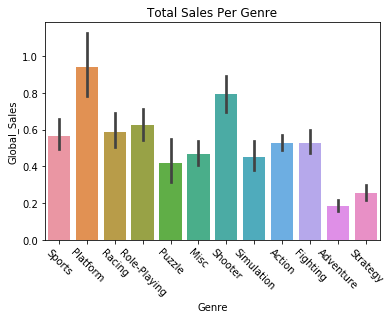
We can also try plotting variables against each other, like getting the global sales of games by their genre.

sns.barplot(x='Genre', y='Global_Sales', data=vg_data)
plt.title("Total Sales Per Genre")
plt.xticks(rotation=-45)
plt.show()

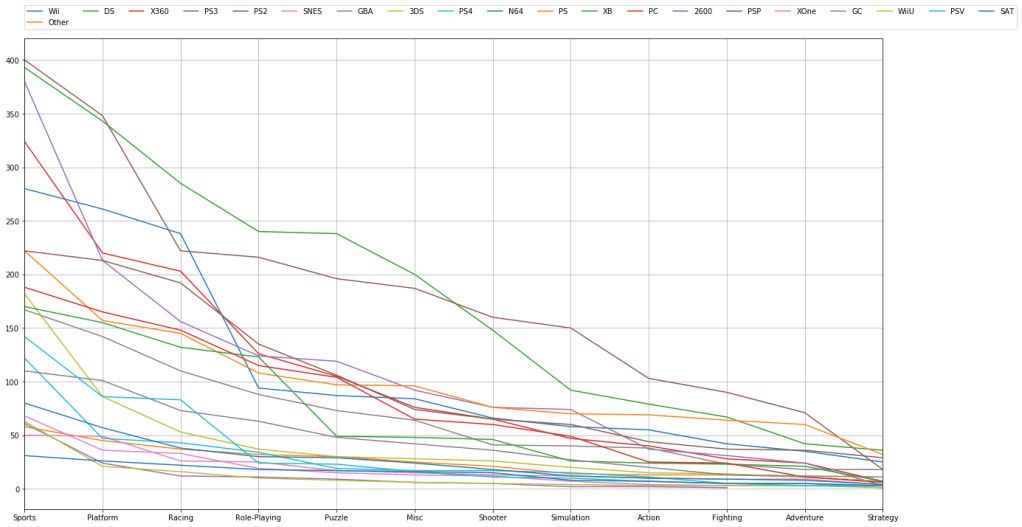
We can filter and plot by multiple criteria. If we wanted to check and see how many games are published in a given genre AND filter by platform we can do that. We just need to get the individual platforms, which we can do by filtering the “platform” feature with a “unique” function. Then we just have to plot the platform and genre data for each of those platforms.

# try visualizing the number of games in a specific genre
for i in vg_data['Platform'].unique():
    vg_data['Genre'][vg_data['Platform'] == i].value_counts().plot(kind='line', label=i, figsize=(20, 10), grid=True)

# set the legend and ticks

plt.legend(bbox_to_anchor=(0., 1.02, 1., .102), loc=3, ncol=20, borderaxespad=0.)
plt.xticks(np.arange(12), tuple(vg_data['Genre'].unique()))
plt.tight_layout()
plt.show()


Now that we’ve plotted some of the data, let’s try predicting some trends based off of the data. We can carry out linear regression to get an idea of how global sales figures could end up based on North American sales figures. First we need to separate our data into train and test sets. We’ll start by setting North American sales as our X variable and global sales as our Y variable, and then do train/test split.

# going to attempt to carry out linear regression and predict the global sales of games
# based off of the sales in North America

X = vg_data.iloc[:, 6].values
y = vg_data.iloc[:, 10].values

# train test split and split the dataframe

X_train, X_test, y_train, y_test = train_test_split(X, y, test_size=0.2, random_state=8)

The data needs to be reshaped in order to be compatible with Linear Regression, so we’ll do that with the following commands. We’re reshaping them into two long 2D arrays that have as many rows as necessary and a single column. After that we can fit the data in the Linear Regression function.

# reshape the data into long 2D arrays with 1 column and as many rows as necessary
X_train = X_train.reshape(-1, 1)
X_test = X_test.reshape(-1, 1)
y_train = y_train.reshape(-1, 1)
y_test = y_test.reshape(-1, 1)

lin_reg = LinearRegression()
lin_reg.fit(X_train, y_train)

LinearRegression(copy_X=True, fit_intercept=True, n_jobs=None, normalize=False)

Let’s check to see how our regression algorithm performed. We should plot the correlation between the variable’s training data, and plot the line of best fit from our regressor. We’ll then do the same thing for our testing data. Essentially we’re looking to see how the regression line fits both the training and testing data.

The regression lines should look approximately the same, and indeed they look fairly similar. The training set regression shows approximately 70 million sales for 40 million North American sales, while the test set regression may be just a little higher. We’ll also print the scores on the training and test sets, and see that our Linear Regression implementation had similar, though slightly worse accuracy on the testing set.

Let’s make a function to handle the plotting.

def plot_regression(classifier):

    plt.scatter(X_train, y_train,color='blue')
    plt.plot(X_train, classifier.predict(X_train), color='red')
    plt.title('(Training set)')
    plt.xlabel('North America Sales')
    plt.ylabel('Global Sales')
    plt.show()

    plt.scatter(X_test, y_test,color='blue')
    plt.plot(X_train, classifier.predict(X_train), color='red')
    plt.title('(Testing set)')
    plt.xlabel('North America Sales')
    plt.ylabel('Global Sales')
    plt.show()
    
plot_regression(lin_reg)
print("Training set score: {:.2f}".format(lin_reg.score(X_train, y_train)))
print("Test set score: {:.2f}".format(lin_reg.score(X_test, y_test)))


Training set score: 0.89

Test set score: 0.87

We can now implement some other regression algorithms and see how they perform. Let’s try using a Decision Tree regressor.

DTree_regressor = DecisionTreeRegressor(random_state=5)
DTree_regressor.fit(X_train, y_train)
plot_regression(DTree_regressor)

print("Training set score: {:.2f}".format(DTree_regressor.score(X_train, y_train)))
print("Test set score: {:.2f}".format(DTree_regressor.score(X_test, y_test)))
Training set score: 0.96 
Test set score: 0.81 

Now let’s try a Random Forest regressor algorithm.

RF_regressor = RandomForestRegressor(n_estimators=300, random_state=5)
RF_regressor.fit(X_train, y_train)
plot_regression(RF_regressor)

print("Training set score: {:.2f}".format(RF_regressor.score(X_train, y_train)))
print("Test set score: {:.2f}".format(RF_regressor.score(X_test, y_test)))
Training set score: 0.94 
Test set score: 0.84

It looks like Random Forest and plain Linear Regression have comparable performance. However, we might be able to find a regression algorithm that performs better than these two. We’ll use a type of dimensionality reduction called Principal Component Analysis, which tries to distill the important features of a training set down to just the features that have the most influence on the labels/outcome. By reducing the dimensionality/complexity of a featureset, a representation that contains the features with the most predictive power is created. This can improve the predictive power of a regressor.

We’ll create a Scikit-learn Pipeline, which allows us to specify what kind of regression algorithm we want to use (Linear Regression) and how we want to set up the features for it (use the Standard Scaler and PCA).

Note that there’s only one feature we’re predicting off of here, North American sales, so PCA can’t simplify the representation anymore. But if we had more features we were doing regression on PCA could be useful.

components = [
    ('scaling', StandardScaler()),
    ('PCA', PCA()),
    ('regression', LinearRegression())
]

pca = Pipeline(components)
pca.fit(X_train, y_train)
plot_regression(pca)
print("Training set score: {:.2f}".format(pca.score(X_train, y_train)))
print("Test set score: {:.2f}".format(pca.score(X_test, y_test)))
Training set score: 0.89
Test set score: 0.87

We’re now going to try using different regression algorithms to see what kinds of results we get. Let’s try an Elastic Net regressor.

elastic = ElasticNet()
elastic.fit(X_train, y_train)
plot_regression(elastic)
print("Training set score: {:.2f}".format(elastic.score(X_train, y_train)))
print("Test set score: {:.2f}".format(elastic.score(X_test, y_test)))

Training set score: 0.54
Test set score: 0.51

Now let’s try Ridge regression.

ridge_reg = Ridge()
ridge_reg.fit(X_train, y_train)
plot_regression(ridge_reg)
print("Training set score: {:.2f}".format(ridge_reg.score(X_train, y_train)))
print("Test set score: {:.2f}".format(ridge_reg.score(X_test, y_test)))
Training set score: 0.89
Test set score: 0.87

Here’s a Lasso regression implementation.

lasso_reg = Lasso()
lasso_reg.fit(X_train, y_train)
plot_regression(lasso_reg)
print("Training set score: {:.2f}".format(lasso_reg.score(X_train, y_train)))
print("Test set score: {:.2f}".format(lasso_reg.score(X_test, y_test)))
Training set score: 0.38
Test set score: 0.36

Finally, let’s try using AdaBoost regression.

# ADA Boost regressor
ada_reg = AdaBoostRegressor()
ada_reg.fit(X_train, y_train)
plot_regression(ada_reg)

print("Training set score: {:.2f}".format(ada_reg.score(X_train, y_train)))
print("Test set score: {:.2f}".format(ada_reg.score(X_test, y_test)))

Training set score: 0.89
Test set score: 0.81

It looks like Ridge Regression and AdaBoost did the best at predicting the trend.

Thank you for reading through this demonstration of visualizing data and predicting data trends. If you’d like to go further and enhance your understanding of regression algorithms, I suggest checking the documentation for each of the algorithms in Scikit-learn. You can experiment with implementing these techniques on another dataset and altering the regression arguments.

Design a site like this with WordPress.com
Get started