Classifying Mushrooms With Python and Scikit-Learn

Mushrooms can be either toxic or edible. It takes trained mushroom hunters and mycologists to discern the toxic mushrooms from the edible mushrooms. Can machine learning algorithms also classify the edibility of mushrooms? We’ll visualize some of the data here, to get an idea of how the data is related, and then implement several different classifiers on the dataset.

This might go without saying, but don’t take advice about which mushrooms to eat from a random blog post. I do not condone eating any mushrooms based on the patterns revealed in this notebook or in the accompanying Python script or documentation.

To start with, we’ll import all the necessry modules that we need.

import pandas as pd
import seaborn as sns
import numpy as np
import matplotlib.pyplot as plt
from sklearn.preprocessing import LabelEncoder, StandardScaler
from sklearn.decomposition import PCA
from sklearn.metrics import accuracy_score, confusion_matrix, roc_auc_score, classification_report, log_loss
from sklearn.model_selection import train_test_split, cross_val_score
from sklearn.linear_model import LogisticRegression, SGDClassifier
from sklearn.naive_bayes import GaussianNB
from sklearn.svm import SVC
from sklearn.model_selection import GridSearchCV, RandomizedSearchCV
from sklearn.tree import DecisionTreeClassifier
from sklearn.neighbors import KNeighborsClassifier
from sklearn.ensemble import RandomForestClassifier, GradientBoostingClassifier
from xgboost import XGBClassifier
import warnings
warnings.filterwarnings("ignore")

We’ll load in the data for the mushrooms. Then we need to check if there is any null data in the dataset. There are only two classes: edible and poisonous. We can confirm that this is the case by printing the unique values of the class feature. We’re going to need to encode non-numerical data, that is, transform it into a form that our classifiers can use.

Scikit-Learn has a Label Encoder that will represent our non-numerical values as numerical ones. So we’ll create an instance of the encoder and then apply the transformation to every column in the dataset. We can print out the dataframe to be sure that there the transformations have been correct.

m_data = pd.read_csv('mushrooms.csv')

# check for any null values
print(m_data.isnull().sum())

# see all unique values in a category
print(m_data['class'].unique())

# machine learning systems work with integers, we need to encode these
# string characters into ints

encoder = LabelEncoder()
# now apply the transformation to all the columns:
for col in m_data.columns:
    m_data[col] = encoder.fit_transform(m_data[col])
class                       0
cap-shape                   0
cap-surface                 0
cap-color                   0
bruises                     0
odor                        0
gill-attachment             0
gill-spacing                0
gill-size                   0
gill-color                  0
stalk-shape                 0
stalk-root                  0
stalk-surface-above-ring    0
stalk-surface-below-ring    0
stalk-color-above-ring      0
stalk-color-below-ring      0
veil-type                   0
veil-color                  0
ring-number                 0
ring-type                   0
spore-print-color           0
population                  0
habitat                     0
dtype: int64
['p' 'e']
   class  cap-shape  cap-surface  cap-color  bruises  odor  gill-attachment  \
0      1          5            2          4        1     6                1   
1      0          5            2          9        1     0                1   
2      0          0            2          8        1     3                1   
3      1          5            3          8        1     6                1   
4      0          5            2          3        0     5                1   

   gill-spacing  gill-size  gill-color  ...  stalk-surface-below-ring  \
0             0          1           4  ...                         2   
1             0          0           4  ...                         2   
2             0          0           5  ...                         2   
3             0          1           5  ...                         2   
4             1          0           4  ...                         2   

   stalk-color-above-ring  stalk-color-below-ring  veil-type  veil-color  \
0                       7                       7          0           2   
1                       7                       7          0           2   
2                       7                       7          0           2   
3                       7                       7          0           2   
4                       7                       7          0           2   

   ring-number  ring-type  spore-print-color  population  habitat  
0            1          4                  2           3        5  
1            1          4                  3           2        1  
2            1          4                  3           2        3  
3            1          4                  2           3        5  
4            1          0                  3           0        1  

[5 rows x 23 columns]

Now we can do some plotting of the data. Using Matplotlib, let’s do a heatmap plot, which compares the correlation of every feature with every other feature.

# let's see how many poisonous and edible there are of each, 1 is poisonous, 0 is edible
# check to get a rough idea of correlations
correlations = m_data.corr()
plt.subplots(figsize=(20, 15))
#plt.figure(figsize=(16, 14))
data_corr = sns.heatmap(correlations, annot=True, linewidths=0.5, cmap="RdBu_r")
plt.show(data_corr)
mushroom1.png

It looks like the features most closely associated with class are: cap-surface, gill-attachment, gill-size, veil-color, spore-print-color, population, and habitat. Why don’t we see if we can plot the correlations of those variables individually.

features = ["cap-surface", "gill-attachment", "gill-size", "veil-color", "spore-print-color", "population", "habitat"]

for feature in features:
    line_plot = sns.lineplot(x="class", y=feature, label=feature, data=m_data)
    
plt.legend(loc=1)    
plt.show()
mushroom2

If we are so inclined, we can chart how individual attributes are likely to correlate with a mushroom’s likelihood of beind poisonous. We just get the individual colors stored in the “gill-color” feature and we plot them against class. We need to specify the names of the gill-colors and choose colors to represent them in our plot, however.

gill_names =["buff", "red", "gray", "chocolate", "black", "brown", "orange", "pink", "green", "purple", "white", "yellow"]
gill_colors = ["khaki", "Red", "darkGrey", "chocolate", "Black", "saddleBrown", "orange", "lightpink", "darkGreen", "purple", "lightGrey", "Yellow"]

factor = sns.factorplot(x="gill-color",y="class",data=m_data, kind="bar", size = 8,
palette = gill_colors)
factor.set_xticklabels(rotation=45)
factor.set(xticks=range(0,14), xticklabels=gill_names)
factor = factor.set_ylabels("Prob. Poison")
plt.grid(axis='y')
plt.show()

Now we need to split our data into features and labels. This is easy because the “class” feature is the first in the dataframe, so all we need to do is cast the features as everything but the first column and do the opposite for the labels. We’ll also want to scale the data. Scaling our data is important as the data covers a wide range.

The sheer range of the data can throw off the accuracy of our classifier, so by standardizing the data we make sure our classifier performs optimally. We’ll create an instance of the classifier and then transform the data with it. We don’t need to scale the labels/targets as they are only 0 or 1.

X_features = m_data.iloc[:,1:23]  
y_label = m_data.iloc[:, 0]  

# we should probably scale the features, so that SVM or gaussian NB can deliver better predictions
scaler = StandardScaler()
X_features = scaler.fit_transform(X_features)

Principal Component Analysis is a method that can simplify the representation of features, distilling the most important features down into a combination of just a few features. PCA can help improve the outcome of a classifier. However, PCA works best when datasets are large, and since this dataset is relatively small, we may not want to do it. We can plot the conclusions of the PCA to see what kind of dimensions the data would be compressed to.

We fit the PCA on our features and plot the explained variance ratio. The explained variance ratio is a way of measuring how many features describe a given portion of the data. We can plot our this function to get an idea of how many features are needed to describe 90% or 100% of the data. Let’s plot the ratio.

# principal component analysis, may or may not want to do, small dataset
pca = PCA()
pca.fit_transform(X_features)
plt.figure(figsize=(10,10))
# plot the explained variance ratio
plt.plot(np.cumsum(pca.explained_variance_ratio_), 'ro-')
plt.grid()
plt.show()
# it looks like about 17 of the features account for about 95% of the variance in the dataset
mushroom4

Here’s another way that the explained variance can be plotted. Plotting it like this leads to the same conclusion: around 18 features describe 99% of the dataset.

# here's another way to visualize this
pca_variance = pca.explained_variance_

plt.figure(figsize=(8, 6))
plt.bar(range(22), pca_variance, alpha=0.5, align='center', label='individual variance')
plt.legend()
plt.ylabel('Variance ratio')
plt.xlabel('Principal components')
plt.show()
mushroom5

Let’s go ahead and create a new PCA object and use 17 or 18 features to comprise our new featureset.

pca2 = PCA(n_components=17)
x_new = pca2.fit_transform(X_features)
X_train, X_test, y_train, y_test = train_test_split(x_new, y_label, test_size=0.20, random_state=2)

Now we can select our chosen classifiers and run GridSearchCV to find their best possible parameters. GridSearchCV takes a specified list of parameters and tests the classifier with the potential combinatiosn of your schosen parameters to see which combination is best. Doing this should dramatically improve the performance of our classifiers compared to just implementing them vanilla. We have to fit GridSearchCV on the classifiers and our chosen parameters, and then save the optimized settings as a new instance of the classifier.

logreg_clf = LogisticRegression()
parameters_logreg = {"penalty": ["l2"], "solver": ["newton-cg", "lbfgs", "liblinear", "sag", "saga"],
                     "max_iter": [25, 50, 100, 200, 400]}
grid_logreg = GridSearchCV(logreg_clf, parameters_logreg)
grid_logreg.fit(X_train, y_train)
logreg_opt = grid_logreg.best_estimator_

GNB_clf = GaussianNB()
GNB_clf.fit(X_train, y_train)

svc_clf = SVC()
svc_param = {"kernel": ["rbf", "linear"]}
grid_svc = GridSearchCV(svc_clf, svc_param)
grid_svc.fit(X_train, y_train)
svc_opt = grid_svc.best_estimator_

rf_clf = RandomForestClassifier()
parameters_rf = {"n_estimators": [4, 6, 8, 10, 12, 14, 16], "criterion": ["gini", "entropy"], "max_features": ["auto", "sqrt", "log2"],
                 "max_depth": [2, 3, 5, 10], "min_samples_split": [2, 3, 5, 10]}
grid_rf = GridSearchCV(rf_clf, parameters_rf)
grid_rf.fit(X_train, y_train)
rf_opt = grid_rf.best_estimator_

knn_clf = KNeighborsClassifier()
parameters_knn = {"n_neighbors": [3, 5, 10, 15, 20], "weights": ["uniform", "distance"],
                  "leaf_size": [10, 20, 30, 45, 60]}
grid_knn = GridSearchCV(knn_clf, parameters_knn)
grid_knn.fit(X_train, y_train)
knn_opt = grid_knn.best_estimator_

dt_clf = DecisionTreeClassifier()
parameters_dt = {"criterion": ["gini", "entropy"], "splitter": ["best", "random"], "max_features": ["auto", "log2", "sqrt"]}
grid_dt = GridSearchCV(dt_clf, parameters_dt)
grid_dt.fit(X_train, y_train)
dt_opt = grid_dt.best_estimator_

xgb_clf = XGBClassifier()
parameters_xg = {"objective" : ["reg:linear"], "n_estimators" : [5, 10, 15, 20]}
grid_xg = GridSearchCV(xgb_clf, parameters_xg)
grid_xg.fit(X_train, y_train)
xgb_opt = grid_xg.best_estimator_

chosen_metrics = [accuracy_score, log_loss, classification_report]

Finally, we can create a function to do the classification and return our chosen metrics.

def get_reports(metrics, classifier):

    preds = classifier.predict(X_test)
    print("'{}' Performance: ".format(classifier.__class__.__name__))
    acc = accuracy_score(y_test, preds)
    l_loss = log_loss(y_test, preds)
    c_report = classification_report(y_test, preds)
    print("Accuracy: " + str(acc))
    print("Log Loss: " + str(l_loss))
    print("Classificaiton Report: ")
    print(c_report)
    print("----------")

get_reports(chosen_metrics, logreg_opt)
get_reports(chosen_metrics, GNB_clf)
get_reports(chosen_metrics, svc_opt)
get_reports(chosen_metrics, rf_opt)
get_reports(chosen_metrics, knn_opt)
get_reports(chosen_metrics, dt_opt)
get_reports(chosen_metrics, xgb_opt)

'LogisticRegression' Performance: 
Accuracy: 0.9427692307692308
Log Loss: 1.9766989475886843
Classificaiton Report: 
              precision    recall  f1-score   support

           0       0.94      0.96      0.95       860
           1       0.95      0.93      0.94       765

    accuracy                           0.94      1625
   macro avg       0.94      0.94      0.94      1625
weighted avg       0.94      0.94      0.94      1625

----------
'GaussianNB' Performance: 
Accuracy: 0.9298461538461539
Log Loss: 2.423050640308682
Classificaiton Report: 
              precision    recall  f1-score   support

           0       0.92      0.95      0.93       860
           1       0.94      0.91      0.92       765

    accuracy                           0.93      1625
   macro avg       0.93      0.93      0.93      1625
weighted avg       0.93      0.93      0.93      1625

----------
'SVC' Performance: 
Accuracy: 1.0
Log Loss: 9.992007221626413e-16
Classificaiton Report: 
              precision    recall  f1-score   support

           0       1.00      1.00      1.00       860
           1       1.00      1.00      1.00       765

    accuracy                           1.00      1625
   macro avg       1.00      1.00      1.00      1625
weighted avg       1.00      1.00      1.00      1625

----------
'RandomForestClassifier' Performance: 
Accuracy: 1.0
Log Loss: 9.992007221626413e-16
Classificaiton Report: 
              precision    recall  f1-score   support

           0       1.00      1.00      1.00       860
           1       1.00      1.00      1.00       765

    accuracy                           1.00      1625
   macro avg       1.00      1.00      1.00      1625
weighted avg       1.00      1.00      1.00      1625

----------
'KNeighborsClassifier' Performance: 
Accuracy: 1.0
Log Loss: 9.992007221626413e-16
Classificaiton Report: 
              precision    recall  f1-score   support

           0       1.00      1.00      1.00       860
           1       1.00      1.00      1.00       765

    accuracy                           1.00      1625
   macro avg       1.00      1.00      1.00      1625
weighted avg       1.00      1.00      1.00      1625

----------
'DecisionTreeClassifier' Performance: 
Accuracy: 0.992
Log Loss: 0.2763131635190287
Classificaiton Report: 
              precision    recall  f1-score   support

           0       0.99      0.99      0.99       860
           1       0.99      0.99      0.99       765

    accuracy                           0.99      1625
   macro avg       0.99      0.99      0.99      1625
weighted avg       0.99      0.99      0.99      1625

----------
'XGBClassifier' Performance: 
Accuracy: 0.968
Log Loss: 1.1052531461360688
Classificaiton Report: 
              precision    recall  f1-score   support

           0       0.97      0.97      0.97       860
           1       0.97      0.96      0.97       765

    accuracy                           0.97      1625
   macro avg       0.97      0.97      0.97      1625
weighted avg       0.97      0.97      0.97      1625

----------

I highly recommend experimenting with the different classifiers to get a better idea of which classifiers work better under different circumstances. You can check out a list of classifiers supported by Scikit-learn here or here.

Understanding and Implementing Merge Sort In Python

Previously, we’ve covered  binary search and selection sort. This time, we’ll be covering another sorting algorithm – merge sort. Merge sort is a little different from selection sort. While selection sort can’ only be used to sort an unsorted list, merge sort can be utilized to merge two different sorted lists, in addition to sorting an unsorted list. 

The core idea of merge sort is an instance of a divide and conquer approach. First, the entire list/array is split apart into left and right halves. Afterwards, the left half of the array is also divided in half. This recurs until there is only one element in the left and right halves, until the array halves cannot be split further. Afterwards, the values are merged together, being compared and place in sorted order.

This process recurs, gradually sorting and merging groups, until there is only one group with all the elements in their proper order. It is critical to remember that every-time a group is created the sorted order must be maintained.

Here’s an example of the technique, broken into dividing and merging phases.

Dividing Phase:

Assuming we have an array with the following values: [3, 8, 9, 2, 6, 7], the process will look something like this.

Division 1: [3, 8, 9][2, 6, 7]

Division 2: [3] [8, 9] [2] [6,7]

Division 3: [3] [8] [9] [2] [6] [7]

Now comes the merging phase.

Merging Phase:

Merge 1: [3, 8] [2,9] [6,7]

Merge 2: [2, 3, 8, 9][6, 7]

Merge 3: [2, 3, 6, 7, 8, 9]

If two lists are being merged, it is important to compare the elements before they are merged into a single list. Otherwise, the merged list will contain all the sorted elements of one list and then all the sorted elements of the other list.

So let’s make sure we understand the steps to implementing merge sort:

  1. We start with an unsorted list and split it in half.

2. We split the left half of the array into halves.

3. We keep splitting until there is just one element per half.

4. We compare each of the elements

5. The elements are merged into one group, in order.

6. The process continues until the entire array has been sorted and merged.

Now we can try writing merge sort in Python.

This implementation will be  a recursive implementation. When writing a recursive algorithm, remember that the algorithm must have a base-case, or a case where the recursion ends.

In order to implement merge sort in Python, the algorithm can be structured as follows:

def merge_sort(array):
# Only if there are two or more elements
if len(array) > 1:
# get the midpoint in the array
mid = len(array) // 2
# left half is everything before the mid
left = array[:mid]
# right half is everything after the midpoint
right = array[mid:]

# recur the splits on the left and right halves
merge_sort(left)
merge_sort(right)

# we need variables to track the iteration through the arrays
x = 0
y = 0

# Iterator for the main list
z = 0

# here we copy the data into temporary arrays that store the left and right halves
# as long as there are still values within the left and right half of the arrays
# compare the values and swap positions

while x < len(left) and y < len(right):
# if left value is smaller than the right value
if left[x] <= right[y]:
# place the left position into the sorted array
array[z] = left[x]
# update left position
x = x + 1
else:
array[z] = right[y]
y = y + 1
# move to the next portion of the array
z = z + 1

# If there are any elements left over in the left half of the array
# We fill in the primary array with the remaining left values and then move the iterators up
while x < len(left):
array[z] = left[x]
x += 1
z += 1

# Do the same thing for the right half of the array
while y < len(right):
array[z] = right[y]
y += 1
z += 1

listy = [35, 72, 29, 55, 41, 27, 79, 11, 23, 56, 50]
merge_sort(listy)
print(listy)

Here’s the sorted list:

[11, 23, 27, 29, 35, 41, 50, 55, 56, 72, 79]

GameInformer Review Analysis

Analyzing reviews of media is a good way to get acquainted with data analysis and data science ideas/techniques. Because of the tendency for reviewers to give numerical scores to produces they review, it can be fairly easy to visualize how certain other features may correlate with these scores. This blog post will serve as an demonstration of how to analyze and explore data, using review data gathered from GameInformer.

I scraped the review data from GameInformer myself, and what follows is the results of the visualization/analysis. If you are curious about how the scraping was done:

First, the review URLS were collected from the main site.

Next, the review data was collected. Following this, some preprocessing was done to remove duplicate entries and non-standard characters from the review data.

This blog will also act as a quick primer on how to visualize data with Pandas and Seaborn.

Let’s start off by making all the necessary imports.

import pandas as pd
import seaborn as sns
from matplotlib import pyplot as plt
from collections import Counter
import csv

Now we need to load in the data. We also need to get dummy representations of any non-numeric values.

GI_data = pd.read_csv('GIreviewcomplete.csv', encoding = "ISO-8859-1")
GI_data2 = pd.get_dummies(GI_data)

We can get a violin plot for every reviewer. The width of the violins shows how often a particular score was assigned, while the height and length of a violin show the possible range of scores.

#---display violin plot for author and avg score

sns.lmplot(x='author', y='score', data=GI_data, hue='author', fit_reg=False)
sns.violinplot(x='author',y='score', data=GI_data)
plt.xticks(rotation=-90)
plt.show()

It’s possible to filter the database by multiple criteria. For instance, we could return every review over a certain score by a certain reviewer.

EF_reviews = GI_data[(GI_data.author == 'Elise Favis') & (GI_data.score >= 8.0)]
print(EF_reviews)

title score author \ 48 Heaven's Vault 8 Elise Favis 58 Photographs 8 Elise Favis 102 Bury Me, My Love 8 Elise Favis 158 Life Is Strange 2: Episode 1 ? Roads 8 Elise Favis 243 Minit 8 Elise Favis 262 Where The Water Tastes Like Wine 9 Elise Favis 266 Florence 8 Elise Favis 276 Subnautica 8 Elise Favis 286 The Red Strings Club 8 Elise Favis 405 Tacoma 8 Elise Favis 442 Perception 8 Elise Favis 485 Thimbleweed Park 8 Elise Favis 506 Night In The Woods 8 Elise Favis 586 Phoenix Wright: Ace Attorney - Spirit of Justice 8 Elise Favis 678 Day of the Tentacle Remastered 8 Elise Favis r_platform o_platform \ 48 PC PlayStation 4 58 PC iOS, Android 102 Switch PC, iOS, Android 158 PC PlayStation 4, Xbox One 243 PC PlayStation 4, Xbox One, Switch 262 PC PlayStation 4, PC 266 iOS Xbox One, PC 276 PC PlayStation 4, Switch, PC 286 PC Xbox One, Switch, PC 405 PC Xbox One 442 PC PlayStation 4, Xbox One 485 PC Xbox One 506 PlayStation 4 PC 586 3DS PC 678 PlayStation 4 PlayStation Vita, PC publisher developer \ 48 Inkle Inkle 58 EightyEight Games EightyEight Games 102 Playdius The Pixel Hunt, Arte France, FIGS 158 Square Enix Dontnod Entertainment 243 Devolver Digital JW, Kitty, Jukio, and Dom 262 Good Shepard Entertainment Dim Bulb Games, Serenity Forge 266 Annapurna Interactive Annapurna Interactive 276 Unknown Worlds Entertainment Unknown Worlds Entertainment 286 Devolver Digital Deconstructeam 405 Fullbright Fullbright 442 The Deep End Games The Deep End Games 485 Terrible Toybox Terrible Toybox 506 Finji Infinite Fall 586 Capcom Capcom 678 Double Fine Productions Double Fine Productions release_date rating 48 April 16, 2019 Teen 58 April 3, 2019 NaN 102 January 10, 2019 Everyone 10+ 158 September 27, 2018 Mature 243 April 3, 2018 Everyone 262 February 28, 2018 Not rated 266 February 14, 2018 Everyone 276 January 23, 2018 Everyone 10+ 286 January 22, 2018 Rating Pending 405 August 2, 2017 Teen 442 May 30, 2017 Mature 485 March 30, 2017 Teen 506 February 21, 2017 Teen 586 September 8, 2016 Teen 678 March 22, 2016 Teen

Countplots and barplots are useful ways of visualizing data. Countplots just plot the count of your chosen variable, whereas bar plots compare two chosen variables with each other.

plt.figure(figsize=(10, 4))
scores = sns.countplot(x='score', data=GI_data2)
plt.xticks()
plt.show(scores)

plt.figure(figsize=(10, 4))
r_platform = sns.countplot(x="r_platform", data=GI_data)
plt.xticks(rotation=-90)
plt.show(r_platform)

plt.figure(figsize=(10, 4))
rating = sns.countplot(x="rating", data=GI_data)
plt.xticks(rotation=-90)
plt.show(rating)

plt.figure(figsize=(10, 4))
plt.xticks(rotation=-90)
barplot_score = sns.barplot(x="rating", y="score", data=GI_data)
plt.show(barplot_score)

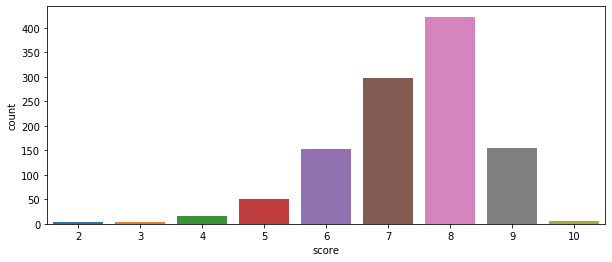
Seaborn also contains a handy distribution function, and in this case we can see the relative distribution of GameInformer review scores. Most of their assigned scores have been an 8.

sns.distplot(GI_data2['score'])
plt.show()

Swarmplots show the individual instances of Y given X, or in this case of a certain score given a certain rating.

plt.figure(figsize=(16, 6))
factorplot_score = sns.swarmplot(x="rating", y="score", data=GI_data, hue='rating')
plt.xticks(rotation= -90)
plt.show(factorplot_score)

Let’s do some analysis of publisher and developer statistics. We’d want to start by getting a list of publishers and developers. Let’s just get the 100 most common.

publishers = Counter(GI_data['publisher'])
developers = Counter(GI_data['developer'])

pub_list = []
dev_list = []

for item, freq in publishers.most_common(100):
    pub_list.append(item)

for item, freq in developers.most_common(100):
    dev_list.append(item)
    
print(pub_list[:10])
print("--------------")
print(dev_list[:10])
[' Nintendo', ' Telltale Games', ' Square Enix', ' Ubisoft', ' Sony Computer Entertainment', ' Devolver Digital', ' Warner Bros. Interactive', ' Microsoft Game Studios', ' Electronic Arts', ' Bandai Namco']
--------------
[' Telltale Games', ' Nintendo', ' Capcom', ' Square Enix', ' EA Tiburon', ' Atlus', ' Visual Concepts', ' EA Canada', ' Dontnod Entertainment', ' Ubisoft Montreal']

If we make a publisher and developer dataframe, we can transform those dataframes by getting the mean and median values of their scores. We can then merge those back into the original dataframe to get a dataframe sorted by publisher which also has the publisher’s mean and median scores. We could do the same thing for developers.

pub_df = pd.DataFrame(index=None)
dev_df = pd.DataFrame(index=None)

# append rows for individual publishers to dataframe

def custom_mean(group):
    group['mean'] = group['score'].mean()
    return group

def custom_median(group):
    group['median'] = group['score'].median()
    return group

for pub in pub_list:
    scores = pd.DataFrame(GI_data[(GI_data.publisher == pub) & (GI_data.score)], index=None)
    pub_df = pub_df.append(scores, ignore_index=True)

pub_mean_df = pub_df.groupby('publisher').apply(custom_mean)
pub_median_df = pub_df.groupby('publisher').apply(custom_median)
pub_median = pub_median_df['median']
pub_merged_df = pub_mean_df.join(pub_median)
print(pub_merged_df.head(3))
pub_merged_df.to_csv('pub_merged.csv')

for dev in dev_list:
    scores = pd.DataFrame(GI_data[(GI_data.developer == dev) & (GI_data.score)], index=None)
    dev_df = dev_df.append(scores, ignore_index=True)

dev_mean_df = dev_df.groupby('developer').apply(custom_mean)
dev_median_df = dev_df.groupby('developer').apply(custom_median)
dev_median = dev_median_df['median']
dev_merged_df = dev_mean_df.join(dev_median)
dev_merged_df.to_csv('dev_merged.csv')
print(dev_merged_df.head(3))
                                               title  score  \
0                          Fire Emblem: Three Houses      9   
1        Marvel Ultimate Alliance 3: The Black Order      7   
2  Cadence of Hyrule ? Crypt of the Necrodancer F...      7   

              author r_platform o_platform  publisher              developer  \
0  Kimberley Wallace     Switch        NaN   Nintendo    Intelligent Systems   
1      Andrew Reiner     Switch        NaN   Nintendo             Team Ninja   
2     Suriel Vazquez     Switch        NaN   Nintendo   Brace Yourself Games   

     release_date           rating     mean  median  
0   July 26, 2019              NaN  7.73913     7.0  
1   July 19, 2019             Teen  7.73913     7.0  
2   June 13, 2019   Rating Pending  7.73913     7.0  
                                              title  score             author  \
0                The Walking Dead: The Final Season      7  Kimberley Wallace   
1    The Walking Dead: The Final Season ? Episode 1      7  Kimberley Wallace   
2  Batman: The Enemy Within Episode 5 ? Same Stitch      9      Javy Gwaltney   

      r_platform                       o_platform        publisher  \
0  PlayStation 4             Xbox One, Switch, PC   Telltale Games   
1             PC          PlayStation 4, Xbox One   Telltale Games   
2  PlayStation 4  PlayStation 4, Xbox One, Switch   Telltale Games   

         developer      release_date           rating  mean  median  
0   Telltale Games    March 27, 2019   Rating Pending  7.16     7.0  
1   Telltale Games   August 14, 2018           Mature  7.16     7.0  
2   Telltale Games    March 27, 2018           Mature  7.16     7.0  

Let’s select just the top publishers and see what their mean and median scores are.

dev_data = pd.read_csv('dev_merged.csv')
dev_data = dev_data.drop(dev_data.columns[0], axis=1)
developer_names = list(dev_data['developer'].unique())
#print(developer_names)

dev_examples = pd.DataFrame(index=None)

for dev in developer_names:
   dev_examples = dev_examples.append(dev_data[dev_data.developer == dev].iloc[0])

#print(dev_examples.to_string())

dev_stats = dev_examples[['developer', 'mean', 'median']]
print(dev_stats.head(20))
                    developer      mean  median
0              Telltale Games  7.160000     7.0
25                   Nintendo  7.714286     7.0
39                     Capcom  7.857143     9.0
46                Square Enix  8.111111     9.0
55                 EA Tiburon  6.666667     7.0
61                      Atlus  7.666667     7.0
67            Visual Concepts  7.666667     7.0
76                  EA Canada  7.000000     7.0
80      Dontnod Entertainment  7.000000     7.0
83           Ubisoft Montreal  7.000000     7.0
87              Firaxis Games  8.428571     9.0
94                   TT Games  7.666667     7.0
97     Blizzard Entertainment  9.000000     9.0
104             From Software  8.714286     9.0
111                Game Freak  7.000000     7.0
113   Double Fine Productions  7.666667     7.0
116       Intelligent Systems  8.200000     9.0
121                      SEGA  8.600000     9.0
126            HAL Laboratory  7.000000     7.0
127            Spike Chunsoft  6.000000     6.0

Another interesting thing we could to is get the worst reviewed games, games that have received less than a 4.

# how you can filter for just one criteria and then pull out only the columns you care about
# print(GI_data[GI_data.score <= 4].title)
# this is actually the preferred method...
print(GI_data.loc[GI_data.score <= 4, 'title'])
69               R.B.I. Baseball 19
124     Overkill's The Walking Dead
134                   The Quiet Man
217               Tennis World Tour
220                           Agony
259               Fear Effect Sedna
301                  Hello Neighbor
343              Raid: World War II
483              R.B.I. Baseball 17
488                 Old Time Hockey
489                 Old Time Hockey
503                      1-2-Switch
589                    One Way Trip
612             Ghostbusters (2016)
637       Homefront: The Revolution
722                   Devil's Third
767                        Armikrog
815                        Godzilla
820     Payday 2: Crimewave Edition
933              Escape Dead Island
935       Sonic Boom: Rise of Lyric
1045          Rambo: The Video Game
1063                         Rekoil
Name: title, dtype: object

We could also get only published by Nintendo by filtering out results where ‘Nintendo’ doesn’t appear in ‘publisher’ with isin.

# can use "isin" in a series...
# spaces are in this, be sure to include them

r = GI_data[GI_data['publisher'].isin([' Nintendo'])][:40]
print(r)

title score \ 0 Fire Emblem: Three Houses 9 5 Marvel Ultimate Alliance 3: The Black Order 7 6 Dr. Mario World 8 19 Super Mario Maker 2 8 23 Cadence of Hyrule ? Crypt of the Necrodancer F... 7 43 BoxBoy! + BoxGirl! 8 64 Yoshi's Crafted World 8 79 Tetris 99 8 101 Mario & Luigi: Bowser's Inside Story + Bowser ... 8 103 New Super Mario Bros. U Deluxe 8 112 Super Smash Bros. Ultimate 9 123 Pokémon: Let's Go, Pikachu 8 144 The World Ends With You: Final Remix 7 151 Super Mario Party 7 161 Xenoblade Chronicles 2: Torna - The Golden Cou... 7 193 Tetris 99 8 196 WarioWare Gold 8 199 Octopath Traveler 8 202 Captain Toad: Treasure Tracker 8 203 Splatoon 2: Octo Expansion 8 209 Mario Tennis Aces 8 212 Pokémon Quest 6 215 Sushi Striker: The Way of Sushido 7 216 Dillon's Dead-Heat Breakers 7 236 Donkey Kong Country: Tropical Freeze 9 246 Detective Pikachu 7 254 Kirby Star Allies 6 300 The Legend Of Zelda: Breath Of The Wild ? The ... 8 308 Xenoblade Chronicles 2 7 335 Super Mario Odyssey 9 338 Fire Emblem Warriors 7 377 Metroid: Samus Returns 9 378 Monster Hunter Stories 8 408 Miitopia 7 410 Hey! Pikmin 6 413 Splatoon 2 8 418 The Legend Of Zelda: Breath Of The Wild ? Mast... 7 426 Ever Oasis 8 431 Arms 8 447 Fire Emblem Echoes: Shadows of Valentia 7 author r_platform o_platform \ 0 Kimberley Wallace Switch NaN 5 Andrew Reiner Switch NaN 6 Ben Reeves iOS Android 19 Kyle Hilliard Switch NaN 23 Suriel Vazquez Switch NaN 43 Ben Reeves Switch NaN 64 Brian Shea Switch NaN 79 Kyle Hilliard Switch Xbox One, PC 101 Kyle Hilliard 3DS Xbox One 103 Brian Shea Switch PC, iOS, Android 112 Jeff Cork Switch PlayStation 4, PC 123 Brian Shea Switch PlayStation 4 144 Kimberley Wallace Switch PC 151 Brian Shea Switch PlayStation 4, Xbox One, Switch 161 Joe Juba Switch PlayStation 4, Switch, PC, Mac 193 Kyle Hilliard Switch PlayStation 4, Xbox One, Switch 196 Kyle Hilliard 3DS PlayStation 4, PlayStation Vita 199 Joe Juba Switch PlayStation 4, Xbox One, Switch, Mac, iOS 202 Ben Reeves Switch 3DS 203 Brian Shea Switch 3DS 209 Kyle Hilliard Switch PlayStation 4, PC 212 Brian Shea Switch iOS, Android 215 Kyle Hilliard Switch 3DS 216 Kyle Hilliard 3DS 3DS 236 Kyle Hilliard Switch Wii U 246 Ben Reeves 3DS PlayStation 4, Xbox One, Switch 254 Kyle Hilliard Switch Xbox One, PC 300 Suriel Vazquez Switch Xbox One, PC 308 Joe Juba Switch PlayStation 4, Xbox One 335 Andrew Reiner Switch Xbox One, Switch, PC 338 Javy Gwaltney Switch PlayStation 4, PC 377 Ben Reeves 3DS Xbox One, PC 378 Daniel Tack 3DS Xbox One, PC 408 Jeff Cork 3DS Xbox One 410 Ben Reeves 3DS PlayStation 4 413 Brian Shea Switch PC 418 Javy Gwaltney Switch Xbox One, PC, Mac, iOS, Android 426 Kyle Hilliard 3DS Xbox One, PlayStation Vita 431 Brian Shea Switch PlayStation 3 447 Javy Gwaltney 3DS Xbox One, Switch, PC publisher developer release_date \ 0 Nintendo Intelligent Systems July 26, 2019 5 Nintendo Team Ninja July 19, 2019 6 Nintendo Nintendo July 10, 2019 19 Nintendo Nintendo June 28, 2019 23 Nintendo Brace Yourself Games June 13, 2019 43 Nintendo HAL Laboratory April 26, 2019 64 Nintendo Good Feel March 29, 2019 79 Nintendo Arika February 13, 2019 101 Nintendo AlphaDream January 11, 2019 103 Nintendo Nintendo January 11, 2019 112 Nintendo Sora, Ltd December 7, 2018 123 Nintendo Game Freak November 16, 2018 144 Nintendo Square Enix, h.a.n.d. October 12, 2018 151 Nintendo Nintendo October 5, 2018 161 Nintendo Monolith Soft September 14, 2018 193 Nintendo Arika February 13, 2019 196 Nintendo Nintendo, Intelligent Systems August 3, 2018 199 Nintendo Square Enix, Acquire July 13, 2018 202 Nintendo Nintendo July 13, 2018 203 Nintendo Nintendo June 13, 2018 209 Nintendo Camelot Software June 22, 2018 212 Nintendo Game Freak May 29, 2018 215 Nintendo Nintendo, indies zero June 8, 2018 216 Nintendo Vanpool May 24, 2018 236 Nintendo Retro Studios May 4, 2018 246 Nintendo Creatures Inc. March 23, 2018 254 Nintendo HAL Laboratory March 16, 2018 300 Nintendo Nintendo December 7, 2017 308 Nintendo Monolith Soft December 1, 2017 335 Nintendo Nintendo October 27, 2017 338 Nintendo Koei Tecmo TBA 377 Nintendo MercurySteam September 15, 2017 378 Nintendo Capcom September 8, 2017 408 Nintendo Nintendo July 27, 2017 410 Nintendo Nintendo July 28, 2017 413 Nintendo Nintendo July 21, 2017 418 Nintendo Nintendo July 30, 2017 426 Nintendo Grezzo June 23, 2017 431 Nintendo Nintendo June 16, 2017 447 Nintendo Intelligent Systems May 19, 2017 rating 0 NaN 5 Teen 6 Everyone 19 NaN 23 Rating Pending 43 Everyone 64 Everyone 79 Everyone 101 Everyone 103 Everyone 112 Mature 123 Everyone 144 Teen 151 Everyone 161 Teen 193 Teen 196 Everyone 10+ 199 Teen 202 Everyone 203 Everyone 10+ 209 Everyone 212 Everyone 215 Everyone 216 Everyone 236 Everyone 246 Everyone 254 Everyone 10+ 300 Everyone 308 Teen 335 Everyone 10+ 338 Rating Pending 377 Everyone 10+ 378 Everyone 10+ 408 Everyone 410 Everyone 10+ 413 Everyone 10+ 418 Everyone 426 Everyone 10+ 431 Everyone 10+ 447 Rating Pending

Finally, let’s do a swarmplot of scores by Nintendo associated developers. We’ll take games published by Nintendo and plot the score given some developers.

plt.figure(figsize=(8, 10))
dev_score = sns.swarmplot(x="developer", y="score", data=r, hue='developer')
plt.grid()
plt.xticks(range(50),rotation=-90)
plt.show(dev_score)

If you’d like to get better acquainted with visualizing data, I suggest checking out the documentation of Pandas and Seaborn and trying to visualize some simple datasets, such as the ones below:

Iris Dataset

Pokemon with Stats

Mushroom Dataset

Did It Rain In Seattle?

Carrying Out Transfer Learning On X-Ray Images

Training a deep neural network can take a substantial amount of time. Not only will you often need to create a model architecture and train the model, but you’ll likely need to tweak the model to get optimal performance out of the model. This can drastically increase the amount of time needed to train a model. In order to speed up the process of training and deploying a model, a technique called transfer learning is used. Transfer learning lets you take a model architecture and reuse it, potentially using the same weights the model has learned before.

You can take a model architecture than has already been defined and reuse it, either using the same weights or retaining the model and just using the architecture. You can also do something in between and retrain just some of the layers of the architecture. This blog post will demonstrate the creation of a deep learning model in Keras and then demonstrate how the model can be reused on another, similar dataset. 

I’ll be creating a Convolutional Neural Network in Keras, saving the model and then reapplying it to another image classification problem. We’ll be using the Chest X-Ray Image Dataset, available HERE for this project. I’ll be splitting up the training data folder into a training and validation set. We’ll use this initial dataset for the training and testing of the model. After that, I’ll apply some perturbations to the test dataset to simulate image corruption and transfer the pre-trained model over, retraining it to classify the damaged images.

To begin with, here are the imports we’ll need.

from keras.preprocessing.image import ImageDataGenerator
import keras
from keras.models import Sequential
from keras.layers import Dense, Conv2D, BatchNormalization, Dropout, MaxPooling2D, Flatten, Activation
from keras.callbacks import ModelCheckpoint, ReduceLROnPlateau, EarlyStopping
import matplotlib.pyplot as plt

Now we’ll define some variables we’ll need, as well as handle different possible input specifications for our model. Some models want the channels listed first, others don’t.

batch_size = 16
im_height = 150
im_width = 150

# handling the different possible input shapes for the model

if keras.backend.image_data_format() == 'channels_first':
    inp_shape = (3, im_width, im_height)
else:
    inp_shape = (im_width, im_height, 3)

We’ll now want to specify the directories and use the ImageDataGenerator to get the image data from the directories. After that, we’ll use the generators and make iterables from them using flow_from_directory.

train_dir = "chest_xray/train"
val_dir = "chest_xray/val"
test_dir = "chest_xray/test"

# generate the data for both training and validation data
# when we instantiate the data generator we pass in transformations to use
# rescaling and flipping here

train_1_datagen = ImageDataGenerator(rescale=1. / 255)

train_2_datagen = ImageDataGenerator(rescale=1. /255, shear_range=0.2, zoom_range=0.2, horizontal_flip=True, rotation_range=30,
                                     width_shift_range=0., channel_shift_range=0.9, brightness_range=[0.5, 1.5])

test_datagen = ImageDataGenerator(rescale=1. /255)

test_datagen_2 = ImageDataGenerator(rescale=1. /255, shear_range=0.2, zoom_range=0.2, horizontal_flip=True, rotation_range=30,
                                     width_shift_range=0., channel_shift_range=0.9, brightness_range=[0.5, 1.5])

# after creating the objects flow from directory
# declare what directory to flow from, as well as image size and batch size
# class mode is binary here, either normal xray or not normal

# we could do "class_mode = binary" here, if so, be sure to make the final output 1 and not 2

train_generator_1 = train_1_datagen.flow_from_directory(train_dir, target_size=(im_width, im_height),
                                                    batch_size=batch_size)

test_generator_1 = test_datagen.flow_from_directory(test_dir, target_size=(im_width, im_height),
                                                    batch_size = batch_size)

train_generator_2 = train_2_datagen.flow_from_directory(val_dir, target_size=(im_width, im_height),
                                                    batch_size = batch_size)

test_generator_2 = test_datagen_2.flow_from_directory(test_dir, target_size=(im_width, im_height),
                                                    batch_size = batch_size)

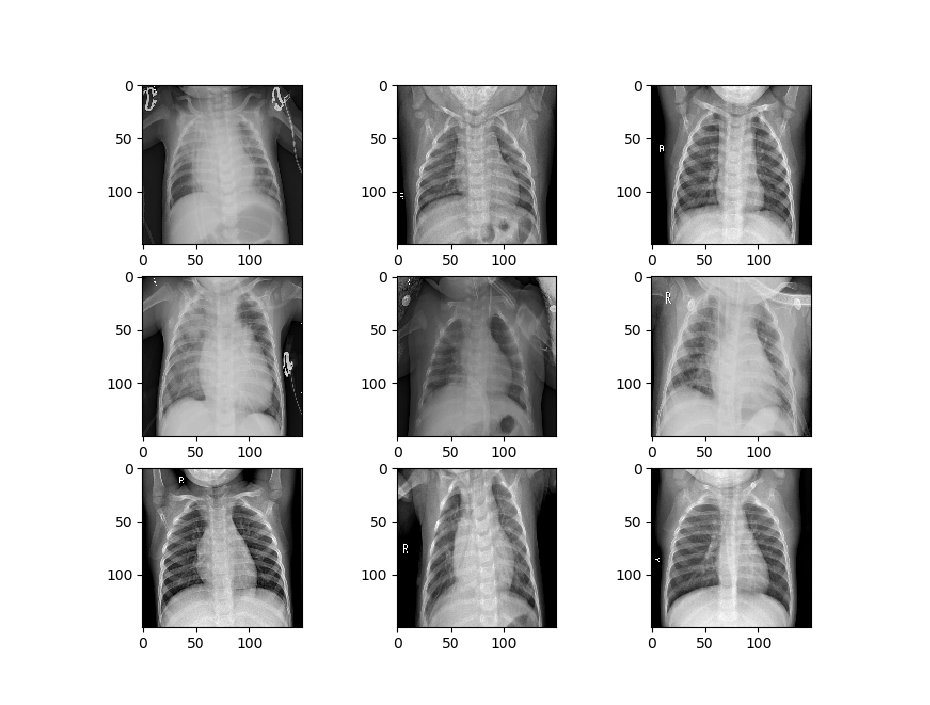
Let’s visualize some of the data to get a better idea of how the datasets will differ. First, we’ll visualize the data that is being used to train the first model.

def image_show(image_generator):
    x, y = image_generator.next()
    fig = plt.figure(figsize=(8, 8))
    columns = 3
    rows = 3
    for i in range(1, 10):
        # img = np.random.randint(10)
        image = x[i]
        fig.add_subplot(rows, columns, i)
        plt.imshow(image.transpose(0, 1, 2))
    plt.show()
    
image_show(train_generator_1)

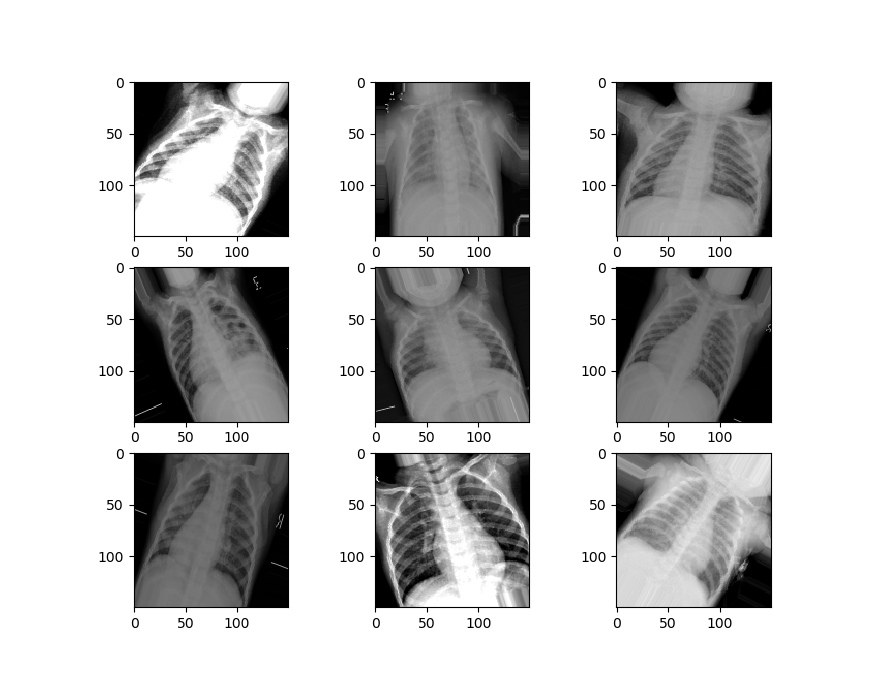
Now we’ll visualize the second set of data.

We can see that our second set of data is a little different from the first set. It’s zoomed in, rotated randomly, has image artifacts and more, to simulate the kinds of damages that might happen to an image in the real world.

Now we can make a function to handle the creation of our model. This function will establish the sequential model form and add the layers of the convolutional network – with the convolutional layers, the Max Pooling, and some batch normalization.

We’ll have three of these “blocks” comprising the convolutional layers in our network. These will be followed by a flattening layer, which transforms the data into a long vector that the densely connected layers of the neural network will be able to analyze. We’ll then add in our densely connected layers and activation functions, along with some dropout to prevent overfitting. We then compile the model and return it.

def create_model():
    # first specify the sequential nature of the model

    model = Sequential()

    # second parameter is the size of the "window" you want the CNN to use

    # the shape of the data we are passing in, 3 x 150 x 150
    # last element is just the image in the series, others are pixel widths

    model.add(Conv2D(64, (3, 3), input_shape=(150, 150, 3)))
    model.add(Activation("relu"))
    model.add(MaxPooling2D(pool_size=(2,2)))
    model.add(BatchNormalization())

    model.add(Conv2D(128, (3, 3)))
    model.add(Activation("relu"))
    model.add(MaxPooling2D(pool_size=(2,2)))
    model.add(BatchNormalization())

    model.add(Conv2D(256, (3, 3)))
    model.add(Activation("relu"))
    model.add(MaxPooling2D(pool_size=(2, 2)))
    model.add(BatchNormalization())

    model.add(Conv2D(256, (3, 3)))
    model.add(Activation("relu"))
    model.add(MaxPooling2D(pool_size=(2, 2)))
    model.add(BatchNormalization())

    # you'll need to flatten the data again if you plan on having Dense layers in the model,
    # as it needs a 1d unlike a 2d CNN

    model.add(Flatten())

    model.add(Dense(128, activation='relu'))
    model.add(Dropout(0.2))
    model.add(Dense(64, activation='relu'))
    model.add(Dropout(0.2))
    model.add(Dense(2, activation='sigmoid'))

    # now compile the model, specify loss, optimization, etc

    model.compile(loss='binary_crossentropy', optimizer='adam', metrics=['accuracy'])

    # fit the model, specify batch size, validation split and epochs

    return model

model = create_model()


Now we’ll create the model by calling the function.

We need to use the fit_generator function to fit our model since we used a data generator to set up the image data. We’re also going to specify some callbacks here, which specify how we want our model to behave while training.

The callbacks we will use include:

Model Checkpoint – which saves weights occasionally when a specified event happens (in our case when the validation accuracy improves.

Reduce LR On Plateau, which reduces the learning rate of our classifier when it hits a plateau and stops improving on the loss. This helps to avoid getting stuck oscillating around minimum loss.

Finally, Early Stopping lets us stop training early if we’ve hit a point where validation loss stops decreasing for some given amount of time, which is defined by our “patience”.

We pass in these callbacks and then fit the model, saving it in a variable so we can access the training records later.

filepath = "weights_training_1.hdf5"
callbacks = [ModelCheckpoint(filepath, monitor='val_acc', verbose=1, save_best_only=True, mode='max'),
              ReduceLROnPlateau(monitor='val_loss', factor=0.2, patience=3, verbose=1, mode='min', min_lr=0.00001),
              EarlyStopping(monitor= 'val_loss', min_delta=1e-10, patience=15, verbose=1, restore_best_weights=True)]

records = model.fit_generator(train_generator_1, steps_per_epoch=100, epochs=25, validation_data=test_generator_1, validation_steps=7, verbose=1, callbacks=callbacks)

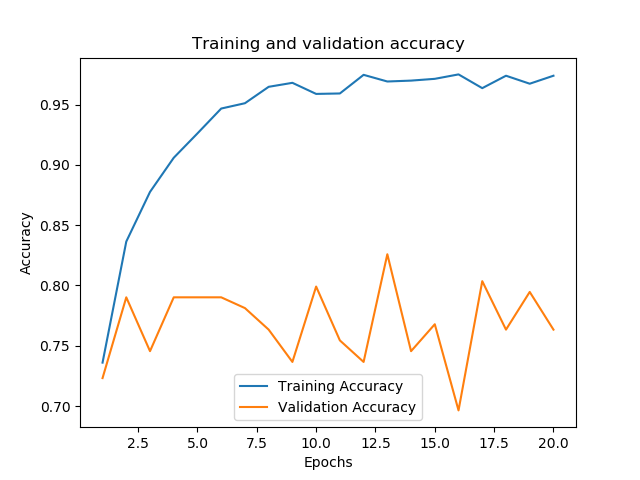
After our training is complete and the best weights have been saved, let’s evaluate the performance of our model. We’ll create a function that plots the loss and accuracy of the training and validation sets. We’ll also evaluate the model’s performance using the evaluation metric we specified in the generator, which we can save to a variable and print.

First, we’ll need to get the loss on the training and validation sets, which we can draw from the “records” variable.

t_loss = records.history['loss']
v_loss = records.history['val_loss']
t_acc = records.history['acc']
v_acc = records.history['val_acc']

# gets the lengt of how long the model was trained for
train_length = range(1, len(t_acc) + 1)

Now we’ll create the function to evaluate our model’s performance.

def evaluation(model, train_length, training_acc, val_acc, training_loss, validation_loss, generator):

    # plot the loss across the number of epochs
    plt.figure()
    plt.plot(train_length, training_loss, label='Training Loss')
    plt.plot(train_length, validation_loss, label='Validation Loss')
    plt.xlabel('Epochs')
    plt.ylabel('Loss')
    plt.legend()

    plt.figure()
    plt.plot(train_length, training_acc, label='Training Accuracy')
    plt.plot(train_length, val_acc, label='Validation Accuracy')
    plt.title('Training and validation accuracy')
    plt.xlabel('Epochs')
    plt.ylabel('Accuracy')
    plt.legend()
    plt.show()

    # compare against the test training set
    # get the score/accuracy for the current model
    scores = model.evaluate_generator(generator)
    print("\n%s: %.2f%%" % (model.metrics_names[1], scores[1] * 100))

We have around 83% accuracy already. Not bad.

acc: 83.09%

Now we can call the function and evaluate how our model trained along with its performance on the dataset.

 evaluation(model, train_length, t_acc, v_acc, t_loss, v_loss, test_generator_1) 

We’re now going to train a second model that uses the weights and architecture from our first model. We’ll load in the trained weights into a second instance of our model. Then we’ll specify that we only want to train the last five layers of our model, a portion of the densely connected layers. We can make sure these are set up to train by printing out the trainable layers of the model.

model_2 = create_model()
model_2.load_weights("weights_training_1.hdf5")

for layer in model_2.layers[:-5]:
    layer.trainable = False

for layer in model_2.layers:
    print(layer, layer.trainable)

Now we just need to compile and fit the model.

# now compile the model, specify loss, optimization, etc
model_2.compile(loss='binary_crossentropy', optimizer='adam', metrics=['accuracy'])

# fit the model, specify batch size, validation split and epochs

filepath = "C:/Users/Daniel/Downloads/chest-xray-pneumonia/chest_xray/weights_training_2.hdf5"
callbacks = [ModelCheckpoint(filepath, monitor='val_acc', verbose=1, save_best_only=True, mode='max'),
              ReduceLROnPlateau(monitor='val_loss', factor=0.2, patience=3, verbose=1, mode='min', min_lr=0.00001),
              EarlyStopping(monitor= 'val_loss', min_delta=1e-10, patience=15, verbose=1, restore_best_weights=True)]

records = model_2.fit_generator(train_generator_2, steps_per_epoch=85, epochs=20, validation_data=test_generator_2, validation_steps=7, verbose=1, callbacks=callbacks)

Finally, let’s check to see how the second model performed by getting its metrics.

t_loss = records.history['loss']
v_loss = records.history['val_loss']
t_acc = records.history['acc']
v_acc = records.history['val_acc']

# gets the length of how long the model was trained for
train_length = range(1, len(t_acc) + 1)

evaluation(model_2, train_length, t_acc, v_acc, t_loss, v_loss, 80, test_generator_2)

acc: 73.48%

We can see that after training it for only two epochs, and despite the perturbations applied to the dataset, performance quickly hit over 70%.

Understanding and Implementing Quick Sort in Python

Last time I covered the theory and implementation of binary search, but now let’s turn to sort algorithms. Before an array can be searched, it must be sorted. One of the most efficient sorting algorithms is Quick Sort, and we’ll be exploring how to implement Quick Sort in Python below. However, let’s go over the theory behind Quick Sort first. 

Quicksort is an example of applying a divide-and-conquer approach to solving a problem. We can make sorting a large array of unsorted value easy by dividing the problem down into smaller steps and just applying these steps again and again until the array is sorted.

The primary concept employed in Quick Sort is partitioning. As we partition, we divide the array into smaller portions and then sort these small chunks. How do we sort the small portions of the array? We do this by first selecting a pivot, or a point in the array that the rest of the array will be shifted around.

After we select the pivot, we need to put the pivot in its correct position in the array. This means making sure that all values in the array smaller than the pivot are to the left and all values that are larger are to the right. We then recur on the right and left half of the array until everything is sorted.

Essentially, we can describe the algorithm as the following steps:

  1. Choose a value as the pivot
  2. Iterate through the array and  place all values smaller than the pivot the left, while all the values larger are to the right. This is done by comparing every value to the pivot. If a value is found that is out of order, the current value and the last sorted element are swapped.
  3. After the above process is completer, the process is carried out on all the values to the left of the pivot value. 
  4. The process is carried out again on all values to the right of the pivot.

How do you go about selecting a pivot value? There are multiple ways to select a pivot value. You can select the first value in the array, the last value in the array, the median value, or a random value.

The most common way that Quick Sort is implemented is by using the last value in the array as the pivot. The example implementation below will use the method where the final element in the array is chosen as the pivot.

Now we’ll take a look at how to implement QuickSort in Python.

To begin with, we’ll create a function that partitions the array. We’ll then use this function within another function to carry out the actual sorting. 

def partition(arr, low, high):

# idx is the current index of the smaller array
idx = (low - 1)
pivot = arr[high]

# c is current value in the loop
for c in range(low, high):
if arr[c] < pivot:
idx = idx + 1

arr[idx], arr[c] = arr[c], arr[idx]

arr[idx + 1], arr[high] = arr[high], arr[idx + 1]
return (idx + 1)

def quick_sort(arr, low, high):

if low < high:
p_idx = partition(arr, low, high)

quick_sort(arr, low, p_idx-1)
quick_sort(arr, p_idx+1, high)

arr = [12, 28, 33, 11, 38, 49, 36, 19, 100, 21, 5, 15, 3]
length = len(arr)
quick_sort(arr, 0, length - 1)
print("Array after sorting:")
for i in range(length):
print(arr[i])

Here’s the results of running the program:

Array after sorting:
3
5
11
12
15
19
21
28
33
36
38
49
100

I suggest you experiment with different sorting algorithms as well as see how run times can vary when sorting arrays under different conditions.

Video Game Sales Analysis – Visualization and Regression

In machine learning, most problems can put in one of two categories: unsupervised learning and supervised learning. In supervised learning tasks, you know what classes your data points belong to, which means that you can check the performance of your classifier on your dataset. In contrast, in an unsupervised learning task you don’t have specific class labels for your data and it is often up to the researcher to come up with meaningful correlations and explore potential patterns in the dataset using statistical techniques like regression.

In this post, I’m going to demonstrate the process of taking a dataset and carrying out regression on the dataset in order to predict some possible trends using Scikit-learn in Python. The post will also demonstrate the process of visualizing data with Pandas, Seaborn, and Matplotlib.

For this post, we’ll be using the video game sales dataset, available HERE.

As you might expect, we’ll start off by importing all the libraries we will need.

import matplotlib.pyplot as plt
import pandas as pd
import numpy as np
import seaborn as sns
from sklearn.model_selection import train_test_split
from sklearn.linear_model import LinearRegression, ElasticNet, Lasso, Ridge
from sklearn.tree import DecisionTreeRegressor
from sklearn.ensemble import RandomForestRegressor, AdaBoostRegressor
from sklearn.preprocessing import StandardScaler
from sklearn.decomposition import PCA
from sklearn.pipeline import Pipeline

Let’s start off by loading the data and checking the number of occurrences for features we might be interested in.

df = pd.read_csv("vgsales.csv")

# get an idea of the total number of occurences for important features

publishers = df['Publisher'].unique()
platforms = df['Platform'].unique()
genres = df['Genre'].unique()

print("Number of games: ", len(df))
print("Number of publishers: ", len(publishers))
print("Number of platforms: ", len(platforms))
print("Number of genres: ", len(genres))
Number of games:  16598
Number of publishers:  579
Number of platforms:  31
Number of genres:  12

We need to be sure that our data is free of any null values, so we’ll check for them and drop them if there are any.

print(df.isnull().sum())

# drop them if there are any
df = df.dropna()
Rank              0
Name              0
Platform          0
Year            271
Genre             0
Publisher        58
NA_Sales          0
EU_Sales          0
JP_Sales          0
Other_Sales       0
Global_Sales      0
dtype: int64

One of the first things we may try doing is checking to see how many global game sales there are a year. We can count how many years there are in the database, then we can plot the years against the global sales.

# if we wanted the counts instead, we could just use Count. Count returns the number of instances,
# not the sums of the values like above
x = df.groupby(['Year']).count()
x = x['Global_Sales']
y = x.index.astype(int)

plt.figure(figsize=(12,8))
colors = sns.color_palette("muted")
ax = sns.barplot(y = y, x = x, orient='h', palette=colors)
ax.set_xlabel(xlabel='Number of releases', fontsize=16)
ax.set_ylabel(ylabel='Year', fontsize=16)
ax.set_title(label='Game Releases Per Year', fontsize=20)

plt.show()


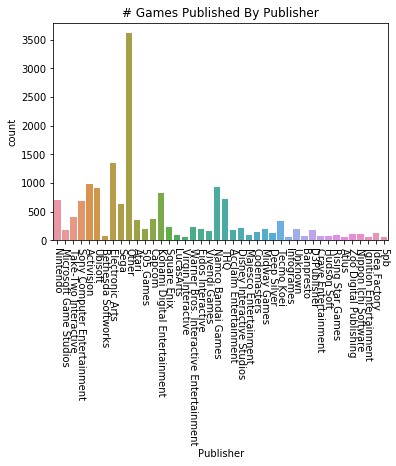
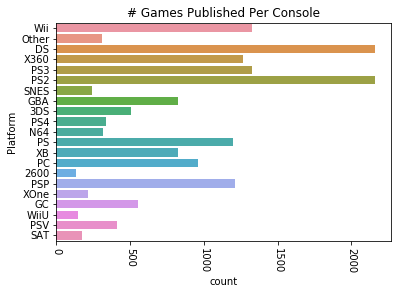
Let’s get an idea of how many games are published by specific publishers. There’s a lot of publishers in this list, so we want to drop any publishers that have published fewer than a chosen number of games. Let’s set 75 as a threshhold. We’ll also apply this same method to the platforms the games are published on.

After dropping much of the data, we can try plotting the remaining data that we’ve put into a new dataframe. We’ll plot the number of games published by both the most prolific publishers and the number published on different consoles.

vg_data = pd.read_csv('vgsales.csv')

print(vg_data.info())
print(vg_data.describe())

# let's choose a cutoff and drop any publishers that have published less than X games

for i in vg_data['Publisher'].unique():
    if vg_data['Publisher'][vg_data['Publisher'] == i].count() < 60:
        vg_data['Publisher'][vg_data['Publisher'] == i] = 'Other'

for i in vg_data['Platform'].unique():
    if vg_data['Platform'][vg_data['Platform'] == i].count() < 100:
        vg_data['Platform'][vg_data['Platform'] == i] = 'Other'

#try plotting the new publisher and platform data
sns.countplot(x='Publisher', data=vg_data)
plt.title("# Games Published By Publisher")
plt.xticks(rotation=-90)
plt.show()

plat_data = vg_data['Platform'].value_counts(sort=False)
sns.countplot(y='Platform', data=vg_data)
plt.title("# Games Published Per Console")
plt.xticks(rotation=-90)
plt.show()
RangeIndex: 16598 entries, 0 to 16597
Data columns (total 11 columns):
Rank            16598 non-null int64
Name            16598 non-null object
Platform        16598 non-null object
Year            16327 non-null float64
Genre           16598 non-null object
Publisher       16540 non-null object
NA_Sales        16598 non-null float64
EU_Sales        16598 non-null float64
JP_Sales        16598 non-null float64
Other_Sales     16598 non-null float64
Global_Sales    16598 non-null float64
dtypes: float64(6), int64(1), object(4)
memory usage: 1.4+ MB
None
               Rank          Year      NA_Sales      EU_Sales      JP_Sales  \
count  16598.000000  16327.000000  16598.000000  16598.000000  16598.000000   
mean    8300.605254   2006.406443      0.264667      0.146652      0.077782   
std     4791.853933      5.828981      0.816683      0.505351      0.309291   
min        1.000000   1980.000000      0.000000      0.000000      0.000000   
25%     4151.250000   2003.000000      0.000000      0.000000      0.000000   
50%     8300.500000   2007.000000      0.080000      0.020000      0.000000   
75%    12449.750000   2010.000000      0.240000      0.110000      0.040000   
max    16600.000000   2020.000000     41.490000     29.020000     10.220000   

        Other_Sales  Global_Sales  
count  16598.000000  16598.000000  
mean       0.048063      0.537441  
std        0.188588      1.555028  
min        0.000000      0.010000  
25%        0.000000      0.060000  
50%        0.010000      0.170000  
75%        0.040000      0.470000  
max       10.570000     82.740000  

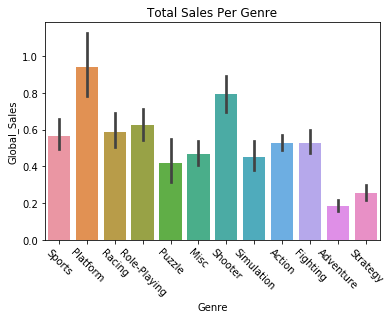
We can also try plotting variables against each other, like getting the global sales of games by their genre.

sns.barplot(x='Genre', y='Global_Sales', data=vg_data)
plt.title("Total Sales Per Genre")
plt.xticks(rotation=-45)
plt.show()

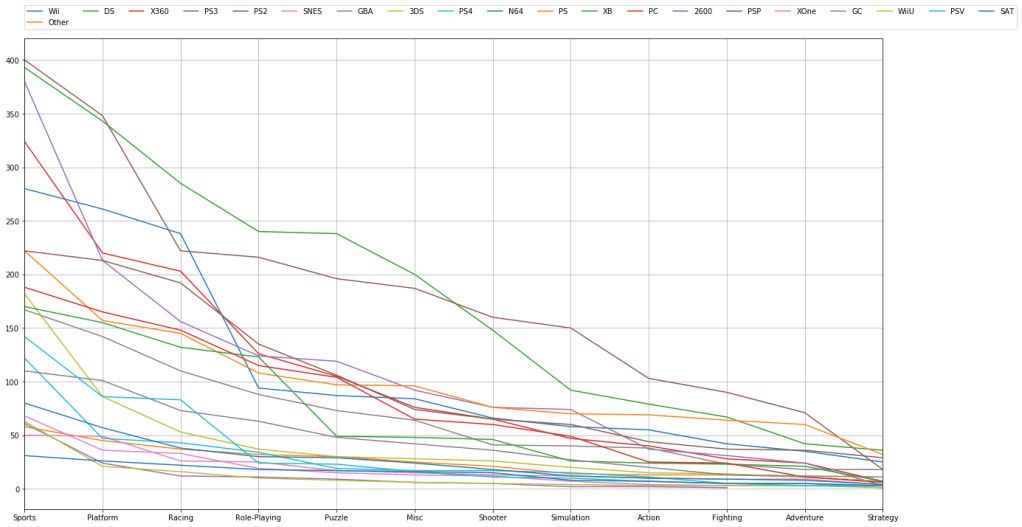
We can filter and plot by multiple criteria. If we wanted to check and see how many games are published in a given genre AND filter by platform we can do that. We just need to get the individual platforms, which we can do by filtering the “platform” feature with a “unique” function. Then we just have to plot the platform and genre data for each of those platforms.

# try visualizing the number of games in a specific genre
for i in vg_data['Platform'].unique():
    vg_data['Genre'][vg_data['Platform'] == i].value_counts().plot(kind='line', label=i, figsize=(20, 10), grid=True)

# set the legend and ticks

plt.legend(bbox_to_anchor=(0., 1.02, 1., .102), loc=3, ncol=20, borderaxespad=0.)
plt.xticks(np.arange(12), tuple(vg_data['Genre'].unique()))
plt.tight_layout()
plt.show()


Now that we’ve plotted some of the data, let’s try predicting some trends based off of the data. We can carry out linear regression to get an idea of how global sales figures could end up based on North American sales figures. First we need to separate our data into train and test sets. We’ll start by setting North American sales as our X variable and global sales as our Y variable, and then do train/test split.

# going to attempt to carry out linear regression and predict the global sales of games
# based off of the sales in North America

X = vg_data.iloc[:, 6].values
y = vg_data.iloc[:, 10].values

# train test split and split the dataframe

X_train, X_test, y_train, y_test = train_test_split(X, y, test_size=0.2, random_state=8)

The data needs to be reshaped in order to be compatible with Linear Regression, so we’ll do that with the following commands. We’re reshaping them into two long 2D arrays that have as many rows as necessary and a single column. After that we can fit the data in the Linear Regression function.

# reshape the data into long 2D arrays with 1 column and as many rows as necessary
X_train = X_train.reshape(-1, 1)
X_test = X_test.reshape(-1, 1)
y_train = y_train.reshape(-1, 1)
y_test = y_test.reshape(-1, 1)

lin_reg = LinearRegression()
lin_reg.fit(X_train, y_train)

LinearRegression(copy_X=True, fit_intercept=True, n_jobs=None, normalize=False)

Let’s check to see how our regression algorithm performed. We should plot the correlation between the variable’s training data, and plot the line of best fit from our regressor. We’ll then do the same thing for our testing data. Essentially we’re looking to see how the regression line fits both the training and testing data.

The regression lines should look approximately the same, and indeed they look fairly similar. The training set regression shows approximately 70 million sales for 40 million North American sales, while the test set regression may be just a little higher. We’ll also print the scores on the training and test sets, and see that our Linear Regression implementation had similar, though slightly worse accuracy on the testing set.

Let’s make a function to handle the plotting.

def plot_regression(classifier):

    plt.scatter(X_train, y_train,color='blue')
    plt.plot(X_train, classifier.predict(X_train), color='red')
    plt.title('(Training set)')
    plt.xlabel('North America Sales')
    plt.ylabel('Global Sales')
    plt.show()

    plt.scatter(X_test, y_test,color='blue')
    plt.plot(X_train, classifier.predict(X_train), color='red')
    plt.title('(Testing set)')
    plt.xlabel('North America Sales')
    plt.ylabel('Global Sales')
    plt.show()
    
plot_regression(lin_reg)
print("Training set score: {:.2f}".format(lin_reg.score(X_train, y_train)))
print("Test set score: {:.2f}".format(lin_reg.score(X_test, y_test)))


Training set score: 0.89

Test set score: 0.87

We can now implement some other regression algorithms and see how they perform. Let’s try using a Decision Tree regressor.

DTree_regressor = DecisionTreeRegressor(random_state=5)
DTree_regressor.fit(X_train, y_train)
plot_regression(DTree_regressor)

print("Training set score: {:.2f}".format(DTree_regressor.score(X_train, y_train)))
print("Test set score: {:.2f}".format(DTree_regressor.score(X_test, y_test)))
Training set score: 0.96 
Test set score: 0.81 

Now let’s try a Random Forest regressor algorithm.

RF_regressor = RandomForestRegressor(n_estimators=300, random_state=5)
RF_regressor.fit(X_train, y_train)
plot_regression(RF_regressor)

print("Training set score: {:.2f}".format(RF_regressor.score(X_train, y_train)))
print("Test set score: {:.2f}".format(RF_regressor.score(X_test, y_test)))
Training set score: 0.94 
Test set score: 0.84

It looks like Random Forest and plain Linear Regression have comparable performance. However, we might be able to find a regression algorithm that performs better than these two. We’ll use a type of dimensionality reduction called Principal Component Analysis, which tries to distill the important features of a training set down to just the features that have the most influence on the labels/outcome. By reducing the dimensionality/complexity of a featureset, a representation that contains the features with the most predictive power is created. This can improve the predictive power of a regressor.

We’ll create a Scikit-learn Pipeline, which allows us to specify what kind of regression algorithm we want to use (Linear Regression) and how we want to set up the features for it (use the Standard Scaler and PCA).

Note that there’s only one feature we’re predicting off of here, North American sales, so PCA can’t simplify the representation anymore. But if we had more features we were doing regression on PCA could be useful.

components = [
    ('scaling', StandardScaler()),
    ('PCA', PCA()),
    ('regression', LinearRegression())
]

pca = Pipeline(components)
pca.fit(X_train, y_train)
plot_regression(pca)
print("Training set score: {:.2f}".format(pca.score(X_train, y_train)))
print("Test set score: {:.2f}".format(pca.score(X_test, y_test)))
Training set score: 0.89
Test set score: 0.87

We’re now going to try using different regression algorithms to see what kinds of results we get. Let’s try an Elastic Net regressor.

elastic = ElasticNet()
elastic.fit(X_train, y_train)
plot_regression(elastic)
print("Training set score: {:.2f}".format(elastic.score(X_train, y_train)))
print("Test set score: {:.2f}".format(elastic.score(X_test, y_test)))

Training set score: 0.54
Test set score: 0.51

Now let’s try Ridge regression.

ridge_reg = Ridge()
ridge_reg.fit(X_train, y_train)
plot_regression(ridge_reg)
print("Training set score: {:.2f}".format(ridge_reg.score(X_train, y_train)))
print("Test set score: {:.2f}".format(ridge_reg.score(X_test, y_test)))
Training set score: 0.89
Test set score: 0.87

Here’s a Lasso regression implementation.

lasso_reg = Lasso()
lasso_reg.fit(X_train, y_train)
plot_regression(lasso_reg)
print("Training set score: {:.2f}".format(lasso_reg.score(X_train, y_train)))
print("Test set score: {:.2f}".format(lasso_reg.score(X_test, y_test)))
Training set score: 0.38
Test set score: 0.36

Finally, let’s try using AdaBoost regression.

# ADA Boost regressor
ada_reg = AdaBoostRegressor()
ada_reg.fit(X_train, y_train)
plot_regression(ada_reg)

print("Training set score: {:.2f}".format(ada_reg.score(X_train, y_train)))
print("Test set score: {:.2f}".format(ada_reg.score(X_test, y_test)))

Training set score: 0.89
Test set score: 0.81

It looks like Ridge Regression and AdaBoost did the best at predicting the trend.

Thank you for reading through this demonstration of visualizing data and predicting data trends. If you’d like to go further and enhance your understanding of regression algorithms, I suggest checking the documentation for each of the algorithms in Scikit-learn. You can experiment with implementing these techniques on another dataset and altering the regression arguments.

Understanding And Implementing Binary Search In Python

Studying data structures and algorithms is often a frustrating experience for those looking to get into a software engineering role. However, learning the ins and outs of these algorithms can make you a better programmer. Understanding how basic algorithms like binary search and selection sort operate can aid you in thinking in terms of algorithms, giving you a better intuition for how to break complex problems down into simple, solvable steps. 

In this blog series, I plan on doing a dive into many of the data structures and algorithms programmers need to know. There’s a wide variety of data structures/algorithms to learn about, but we all have to start somewhere. I’ll be starting with a breakdown of a common searching algorithm: binary search.

Understanding Binary Search

Binary search, sometimes called logarithmic search (in reference to its average run-time), is a searching algorithm designed to find items within an array. Binary search assumes that the array in question is sorted.  The “binary” in binary search comes from the fact that it operates by diving an array up into two parts and then recurring this division until the specified value is found or until the no more splits are possible (meaning the item is not found in the array).

The steps of implementing binary search can be broken down as follows:

  1. Start by selecting the middle value in the array.
  2. When given some target value – X, compare X with the middle element of the array.
  3. If target value X matches the middle value, return it.
  4. If the middle vale and X aren’t equal, we check the target value against the middle value. If X is a greater value than the middle element, it follows that X can only be found in the right half of the array, which means that we recur on the right half.
  5. If X is smaller than the middle value, we carry out the actions in step 4, but for the left half of the array instead.

If the number of elements in the array is even instead of odd, this means there isn’t a middle value. So instead, we select the left value plus the right value minus one, and divide everything by 2. Doing this ensures that there is always a value that can be selected as the middle value.

Implementation of Binary Search In Python

There are two ways to implement a binary search algorithm in Python: a recursive implementation and an iterative implementation.

Iterative implementations are actually preferred in Python, as Python has a maximum recursion depth, a point at which Python will cease recurring as a guard against stack overflows.

Let’s cover the recursive implementation first.

To start off with, we’ll create a function that takes in an array, a left value, a right value, and a target X value. 

First, we’ll check the right half of the array, selecting the middle value. If the middle value happens to be the target value, we can just return it and end there.

Otherwise, we need to compare the value and find out if it is bigger or smaller than he middle value. If it’s bigger, it can only be in the right half, and if smaller it can only be in the left half. We can make another call and carry out the same function recursively.

Finally, if the we’ve run through the whole array and none of the values matched our target, we conclude that the value isn’t in the array and end the search.

def binary_search(arr, left, right, target):

not_found = "null"

if right >= left:
mid = left + (right - left) // 2
if arr[mid] == target:
return mid
elif arr[mid] > target:
return binary_search(arr, left, mid - 1, target)
else:
return binary_search(arr, mid + 1, right, target)
else:
return not_found

Now let’s run the code and check the output.

arr = [2, 3, 4, 5, 6, 7, 8, 9, 10, 11, 12, 13, 14]

def run_binary_search(arr, target):
    result = binary_search(arr, 0, len(arr) - 1, target)

    if result == "null":
        print("Target not in array.")
    else:
        print("Target is in array - position: {}".format(result))

run_binary_search(arr, 2)
run_binary_search(arr, 12)
run_binary_search(arr, 19)
run_binary_search(arr, 25)

Output is:

Target is in array – position: 0
Target is in array – position: 10
Target not in array.

I mentioned earlier that  Python actually prefers an iterative approach to searching, avoiding recursion where possible. Let’s go over the iterative approach for Binary search in Python now.

It’s more or less just the same as the recursive approach, except that instead of calling the function recursively we use a “while” loop, so that as long as the array has values which haven’t been searched, it carries out the binary searching process.

def binary_search_iterative(arr, left, right, target):

    not_found = "null"

    while left <= right:
        mid = left + (right - left) // 2
        if arr[mid] == target:
            return mid
        elif arr[mid] < target:
            left = mid + 1
        else:
            right = mid - 1
    else:
        return not_found

arr = [2, 3, 4, 5, 6, 7, 8, 9, 10, 11, 12, 13, 14]

def run_binary_search_iterative(arr, target):
    result = binary_search_iterative(arr, 0, len(arr) - 1, target)

    if result == "null":
        print("Target not in array.")
    else:
        print("Target is in array - position: {}".format(result))

run_binary_search_iterative(arr, 25)
run_binary_search_iterative(arr, 3)

Output is:

Target not in array.
Target is in array – position: 1


Design a site like this with WordPress.com
Get started